Line Item Receipt Breakout
Overview: The Line Item Receipt Breakout option from the Purchase Order menu is used to break a PO into two or more. This is useful when a Vendor back orders items but sends a separate invoice for each shipment. This procedure is very like Line Item Billing from Close Contract. To breakout a PO you must have received and non-received items on the PO. All the items that have been received will stay on the original PO and all the unreceived items will move to a new PO. Each PO will retain the original PO number and will be followed by a sequence number starting with 1 & 2. You can perform this procedure as many times as necessary.
*Note: This REQUIRES a Purchase Order to have 1 or more items received and 1 or more open items.
1. From the Open display screen you will see Purchase Orders with Backorder in the status.
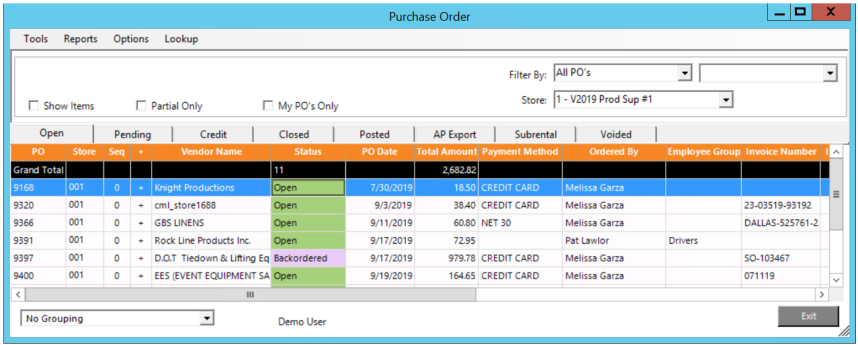
2. Right clicking on the Backordered Purchase Order will display the Line Item Receipt Breakout option.
• Note: Line Item Breakout option will only display by right clicking on a Purchase Order with Backordered in the status. The Purchase Order needs to have at least one open and one closed item.
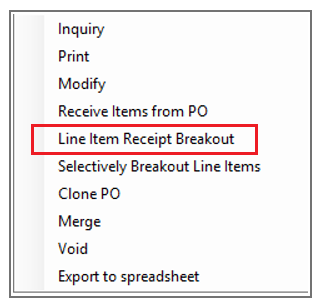
3. From the Purchase Order menu, select Line Item Receipt Breakout.
After selecting the Line Item Receipt Breakout, you will see this screen
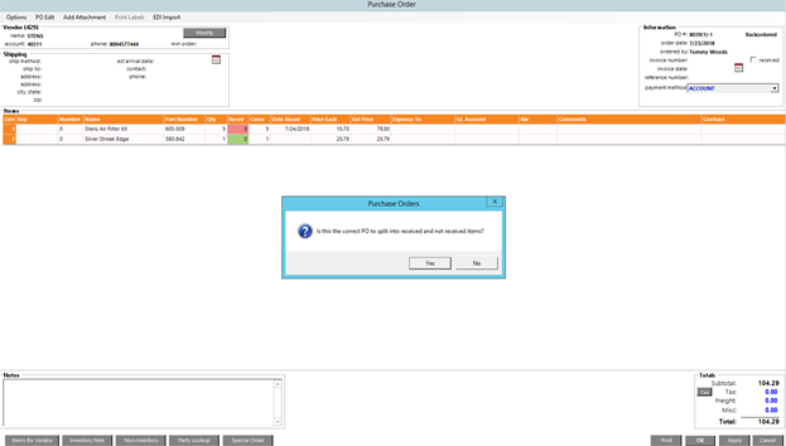
• Note: the PO# in the upper right. In this case, it is #9397.
After answering Yes, PO #9397 will keep the received items and will add a sequence #, in this case PO #8039 (1).
The new PO created will have the items not yet received and the PO number will be PO #9397 (2). Sequence #2.

When you access PO #9397, you will be able to choose from any of the sequences.
