Users Logged Into POR
There are occasions when you open Point of Rental and receive a message that says your number of users has been exceeded. This is tied to the number of Program Menus open. Each Program Menu uses one license.
To see who has multiple Program Menus open, you will need to be at your server computer. This will allow you to see all users. If you do this on your terminal, you will only be able to see yourself. On your server, right click in the task bar at the bottom.
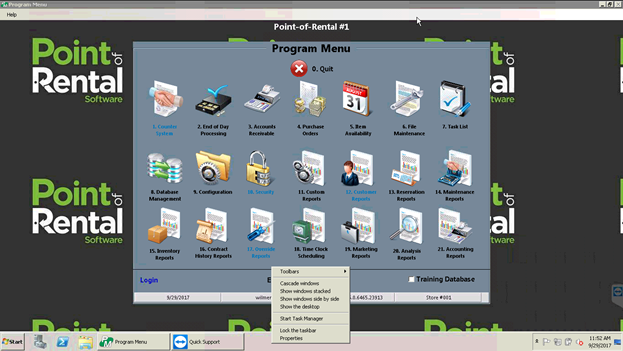
Select ‘Start Task Manager’. The Task Runner will open. You will want to look at the tab that says ‘Processes’. Depending on your version, this information may be under a tab labelled ‘Details’.
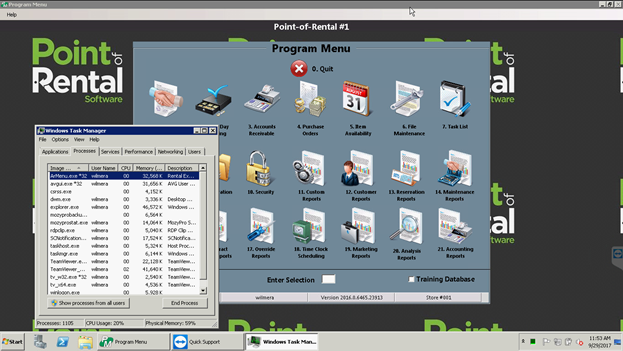
ArMenu.exe is an open Program Menu for Point of Rental. Reference the user name to the right of it to see who has more than one open. The person that has more than one open needs to log completely out of their remote desktop and back in. having multiple Program Menus open occurs when a user has been exiting by clicking the blue ‘X’ at the top of their remote desktop sessions instead of logging out properly.
If you do not have access to the server, you can open the end of day history report and select the blue ‘i’ at the top right to see who has a program menu open.
![image12_7[1]](../Media/image006_027.jpg "image12_7[1]")