System Security
Program Menu>Security>System Security
Overrides
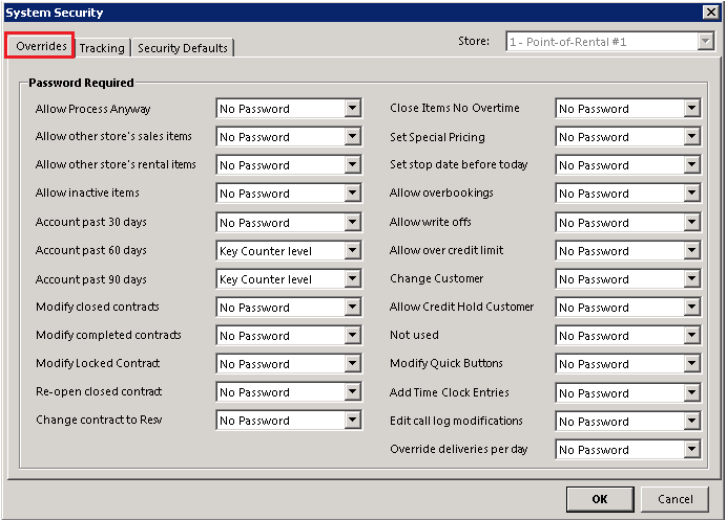

Allow Process Anyway – This parameter sets the minimum level of password needed to allow you to process a transaction when message prompt on screen.
Allow Other Store’s Sale Items – This parameter sets the minimum level of password needed to sell a sales item that belongs to another store. This option is only valid in multi-store systems.
Allow Other Store’s Rental Items – This parameter sets the minimum level of password needed to sell a rental item that belongs to another store. This option is only valid in multi-store systems
Allow Inactive Items– This parameter sets the minimum level of password needed.
Account past 30 days password - This parameter determines which level of password is required to override an account 30 days overdue. Note: If a customer is set to Pay at Open, then no password is required.
Account past 60 days password– This parameter determines which level of password is required to override an account 60 days overdue.
Account past 90 days password – This parameter determines which level of password is required to override an account 90 days overdue.
Modify closed contracts – This parameter determines which level of password is required to modify a closed contract. A setting of “No Password” allows closed contracts to be modified at any time.
Allow Inactive Items– This parameter sets the minimum level of password needed.
Account past 30 days password - This parameter determines which level of password is required to override an account 30 days overdue.
Account past 60 days password– This parameter determines which level of password is required to override an account 60 days overdue.
Modify completed contracts – This parameter determines which level of password is required to modify a completed contract. A setting of “No Password” allows closed contracts to be modified at any time.
Modify a locked contract – This parameter determines which level of password is required to modify a locked contract. A Setting of “No Password” allows locked contracts to be modified at any time.
Re-Open Closed Contract – This parameter determines which level of password is required to modify a closed contract.
Change Contract to Reservation – This parameter determines which level of password is required to allow changing an Open contract into a Reservation contract.
Close Item No Overtime – This parameter determines which level of password is required to allow closing contracts without charging any overtime. The setting of “No Password” allows this selection without any passwords. Note: This option available without a password for delivery/pickup contracts.
Set Special Pricing – This parameter determines which level of password is required to allow setting special pricing. A setting of “No Password” allows setting special rates without any password.
Set Stop date before today – This parameter determines which level of password is required to allowing you to back date a rental item when it is placed on hold.
Allow overbooking– This parameter determines which level of password is required to allow overbooking an item. A setting of “No Password” allows overbooking to be done at any time.
Allow Write offs– This parameter determines which level of password is required to allow write off contracts. A setting of “no Password” allows settings to be written off without any password.
Allow over credit limit - This parameter determine which level of password is required to allow renting to a customer who is over their credit limit. A setting of “No Password” allows renting to all customers over their credit limit without any passwords
Change Customer – This parameter determines which level of password is required to allow changing a customer on an existing contract. A setting of “No Password” allows changing a customer without any password
Allow Credit Hold Customer – This parameter determines which level of password is required to allow renting to a customer who is marked as credit hold.
Modify Quick Button - This parameter determines which level of password is required to modify Quick Buttons.
Add Time Clock Entries – This parameter determines which level of password is required to modify time clock entries. A setting of “No Password” allows changing entries without any password.
Edit Call Log Modifications - This parameter determines which level of password is required to edit call logs. A setting of “No Password” allows changing entries without any password.
Override Deliveries per day - This parameter determines which level of password is required to override deliveries per day. A setting of “No Password” allows changing entries without any password.
Notes about special rates and proper use:
Setting Special Rates - If you have set your parameter to require a password for price change AND you have set your parameter to NOT require a password for Special Pricing, then any time you try to change a price, you will be given the Special Rate option (exception: if double clicking the Price Each field in a contract you can manually set the price with the correct password level). If you set your parameter to require a password for price change AND you have set your parameter to require a password for Special Rate, then you will be prompted for the password to change the price.
Purpose: To prevent users from creating situations where the program must recalculate the rate of a line item and cannot due to a manual price override. In this case, the program will default to use the rate structure defined in the item record. This becomes a problem when the quantity is changed, an item is returned early or late, a continuation bill is generated, or any other circumstance that would cause an item to be re-rated. This is also important if you are doing any rate analysis and need to know the rate structure used to calculate the final rate.
Recommended Setup: Set the Price Override Tracking to level 1 and Set Special Pricing to None. This provides the greatest level of protection from inaccurate rates.
Tracking
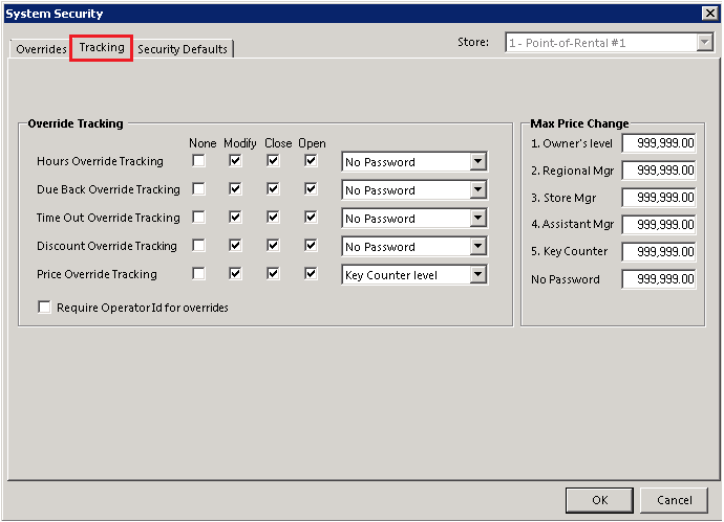
The selections for the Security tab are as follows:
Hours Override Tracking - This parameter determines when override tracking for modifying item hours is recorded on the daily transaction summary. The second section determines the minimum password level that is required to make the change. The selections are 1. Owner’s level password, 2. Regional Manager, 3. Store Manager, 4. Assistant Manager, or 5. Key counter’s password.
Due Back Override code - This parameter determines when override tracking for modifying the item due back date and time is recorded on the daily transaction summary. The second section determines the minimum password level that is required to make the change.
Time Out Override code - This parameter determines when override tracking for modifying contract date and time out is recorded on the daily transaction summary. The second section determines the minimum password level that is required to make the change.
Discount Override code - This parameter determines when override tracking for modifying contract discount percentage is recorded on the daily transaction summary. The second section determines the minimum password level that is required to make the change.
Price Override code - This parameter determines when override tracking for modifying item price is recorded on the daily transaction summary. The second section determines the minimum password level that is required to make the change.
Max Price Change – These options allow you to set the maximum price change that is allowed with each password level. If you put $5.00 under No Password, then a counter person would be able to change a line item price on a contract from 0.01 up to 5.00 without entering any password. If the counter person tried to change a line item by $6.00, then they would have to enter a password. If the password level allowed at least $6.00 price change then it would be allowed. If it was under $6.00, the request would be denied.
Require Operator Id for Overrides - This parameter determines which level of password is required to allow an override when a sales item has insufficient quantity for the current sale.
Security Defaults
Allows you to set security defaults at different levels (Company, Employee, Group) displaying the area, action, type and access allowed to the different areas.

Purchase Order Security - You can define who can Clone, Void or Modify a purchase order.
Vendor Security - You can define what areas of the Vendor record an employee or group can modify such as vendor Address, Account info Contact Info and Products, as well as Delete or Merge records.
Job Site/Venue Security - You can define who can edit the information in each tab also who can view Income History or Special Rates.