Special Days
The end-of-month, quarter and year dates must be defined so the program will know when to end the various accounting periods and automatically generate the proper financial reports. These accounting periods will automatically be set up anytime you redefine your calendar based on your fiscal year end as defined in parameters. * Note: The end-of-month, quarter, and year is only defined at store #1. The remote stores end of periods will follow the main store’s end of periods.
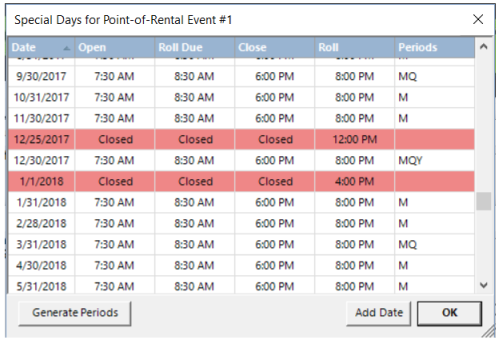
Any “Special” days defined in the calendar will be displayed. The “special days” are end of accounting periods and any days that your open and/or close times differ from your normal workweek, such as Thanksgiving or Christmas. The end of accounting periods is defined as M- end or Month, Q – end of Quarter and Y – end of Year.
Generate Periods
By clicking this button, all special days” will be deleted and the program will automatically define the normal end-of-month, end-of-quarter and end-of-year “special” dates for the current year and the next year. An updated list of “special” dates will then be displayed. * Note – In a multi-store system, no special days such as end of month or year are defined at remote stores. Those “special days” are only defined at store #1.