Set Special Rates
You can set a special rate for a customer, Customer type, or by store. A screen will be displayed that allows you to view, modify, or add special rates set for this item. The screen looks like the following:

You can modify an existing Special Rate by clicking on the line item or you can add a new Special Rate by clicking the Add button. In either case, you will be taken to a screen like the following:
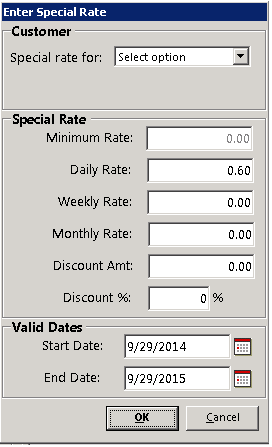
You can define a Special Rate for an individual customer, for ALL customers that are assigned to a specific customer type (for example all Re-rent customers), or for a store. To do this, enter the new rates in the appropriate boxes. When adding a new Special Rate, the rates will default to the normal rates for the item. You can also define a discount dollar amount or a discount percentage amount. Normally if you define a discount dollar amount or a discount percentage amount, you would set all the special prices to zero. In this way, the discount will be taken off the standard pricing for the item. Here is a sample screen that would give 30% off to all customers of type SUBRENT: