Saved User Defined Reports
Saves reports as PDF files when being created through Automatic Reports.
When a report is generated through Automatic Reports, you have the options to print, fax, email or save as a pdf file. If saved as a PDF file, a copy will be placed under the saved user defined reports, can be easily accessed. In automatic reports, you can set the frequency on how often these reports are to be generated. (Daily, Weekly, Monthly, Yearly).
From Program Menu go to Accounting Reports Menu, select Saved User Define Reports.
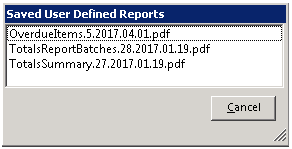
You can view any of these reports by clicking of the selected file. Reports are listed by Name, Year-Month-Day format.
