Repackaging of Bulk Purchases
Overview: Do you purchase items in large or bulk quantities and repackage them in smaller quantities for resale? Do you need the ability to track that inventory through Point-of-Rental for accounting purposes? This can be accomplished in Point-of-Rental for items you sell in this manner; chemicals, fuel, balloons, or any item you repackage yourself. This How to Guide will walk you through the setup of the necessary item records and packages.
1. Create an Item Record for the bulk item (this is the smallest quantity you sell this item in).
• Set the Item Key and Name. Example: Key - CHEMICALB, Name - BULK CHEMICAL PER GALLON.
• The item type should be ‘Sales Item’ or 'Sales - Fractional Qty'
• If you are using Global Headers set the Home and Current Loc to ‘000’. Otherwise, create this record for each store. (Global Headers make this process much easier.)
• Determine a category for this item. (if you need to create a new category, do it now).
• Make sure to set a sell price and any quantity discount pricing.
• Mark the item as a bulk item on the Options Tab.
Bulk Item – Use this field if you want to transfer item quantity between stores rather than transferring the item record between stores.
Normal Bulk – For Bulk items that are not serialized
Bulk Serialized – For items that have unique identifiers
RFID Bulk – For items that are RFID
Example of Bulk Item Record:
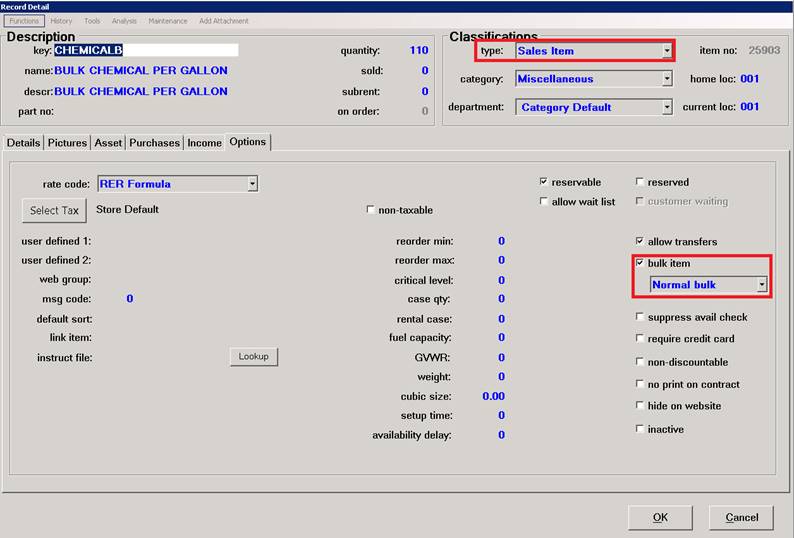
• When purchasing this item, you will purchase in the smallest unit you sell. (i.e. 55 gallons of chemical as opposed to 1 - 55-gallon barrel of chemical). This will allow you sell in 1 gallon increments.
2. Create an Item Record for the various size containers you wish to sell. In this example, we are repackaging the bulk material in a 5-gallon container and this container is an item we inventory, purchase, and sell.
• Create an item record for each of the containers you intend to sell.
• Set the Item Key and Name. Example: Key - CHEMICAL5, Name - CHEMICAL 5 GALLON CONTAINER.
• The item type should be ‘Sales Item’.
• If you are using Global Headers set the Home and Current Loc to ‘000’. Otherwise, create this record for each store. (Global Headers make this process much easier.)
• Determine a category for this item. (if you need to create a new category, do it now).
• Make sure to set a sell price and any quantity discount pricing that may apply to your container. It is not a requirement to price this item.
• Mark the item as a bulk item on the Options Tab.
• Repeat for each container size you sell.
Example of a Various Quantity Item:
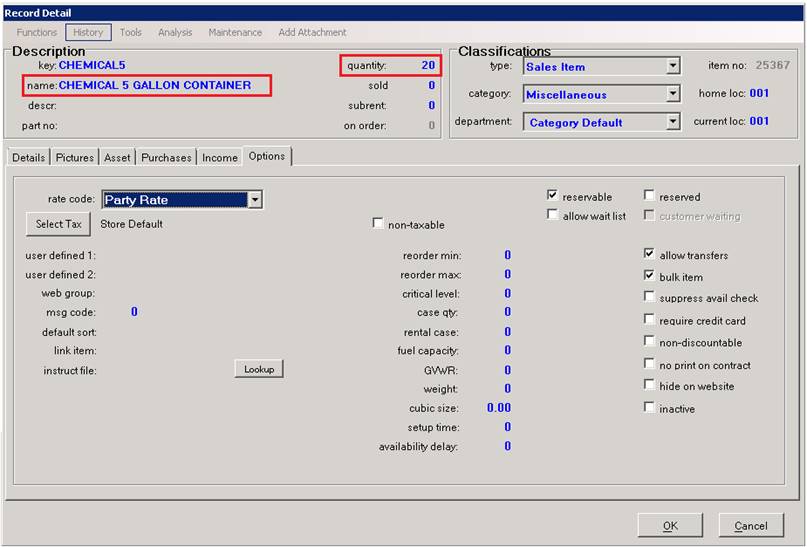
• When purchasing this item, enter each quantity (i.e. 20 - individual 5 gallon containers)
3. Create the package for each size container.
• Select your repackaged item record.
• From the Tools drop down menu choose Package Items.
• Add the bulk item as a package item within the repackaged item record.
• You can set special pricing in the package or use the pricing from the bulk item
*Note: If your container item has any accessory items such as lids or pumps that you would like to inventory also, you should create those item records and add them to the package.
Example of the Package:

Example contract showing pricing from the bulk item:
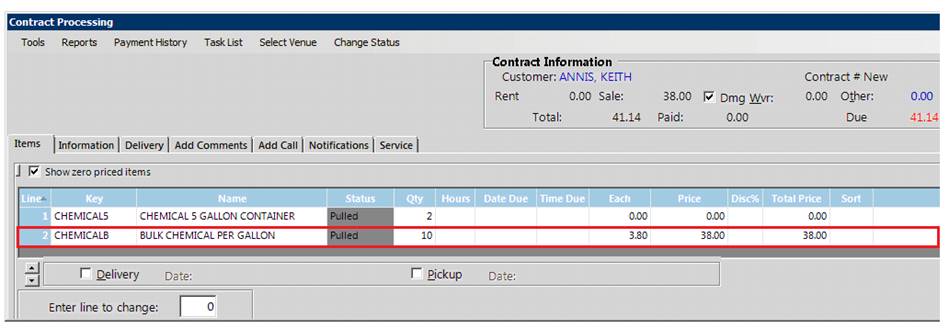
Note the items, quantities, and quantity discounts that were applied. Pricing is driven by the bulk item.
Example contract showing pricing from the repackaged item:

Note the items, quantities, and item pricing. Pricing is driven by the repackaged item.
This next example illustrates handling propane when buying in gallons and selling in gallons and pounds. You will need to create item records for the Propane Per Gallon and the Propane Per Pound.
Example of Propane Per Pound:
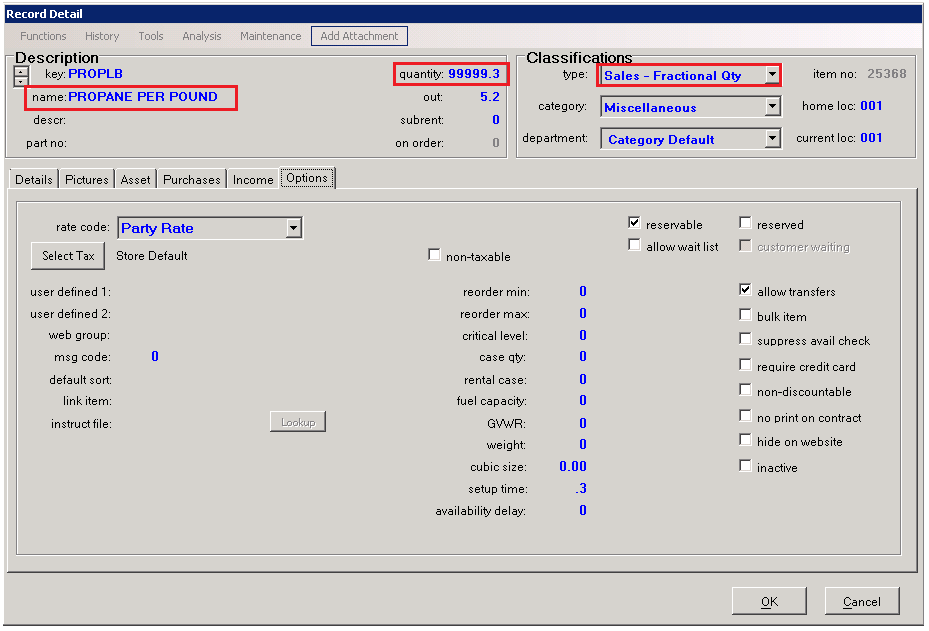
Note the quantity of 999999. This is not an inventoried item and just a means of selling gallons of propane by weight. In the options tab, the 'Suppress Availability Check' should be checked.
Example of Propane Per Gallon:

For this to work you will need to do a conversion of gallons to pounds. In this example, 4.2 pounds is equal to 1 gallon of propane. Therefore, 0.24 gallons is equal to 1 pound. In our example, we are setting the sell price of propane per gallon $5.00 making the sell price of 1 pound of propane $1.19.
The package for the Propane Per Pound will need to include the Propane Per Gallon item with a quantity of 0.24. You can choose whether the pricing is applied on the Per Pound or Per Gallon item.
If you set the Sell Price on the Per Gallon item only and DO NOT discount the Per Gallon item in the Per Pound Package you can quickly make price adjustments that will flow through to the Per Pound item. If you sell propane by the gallon, pound, liter, repackaged 5-gallon tank, or by the drop, the pricing will always be driven from the Per Gallon Item Record.
In the example below you will see propane being sold at a quantity of 1 pound and 4.2 pounds. Pricing in this example was set on the Propane per Pound item. It could be set on the Per Gallon item if desired.
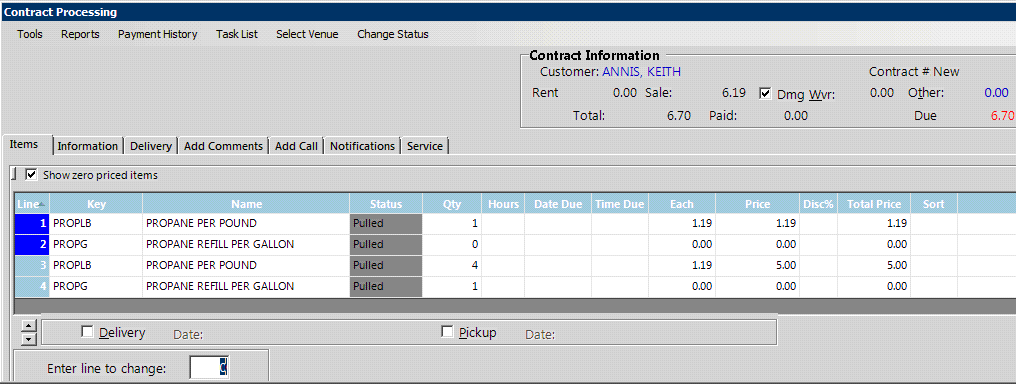
Note the change in the Per Gallon quantities.