Receive Items from PO
When you receive items from a PO, the quantity of the inventory item will be increased by the received count. Also the items purchase history will be updated detailing the purchase date, purchase order number, quantity order, purchase price, and extra charges.
Program Menu>Purchase Order
You will be entered into the purchase order display, click on the selected purchase order, and the following screen will appear.
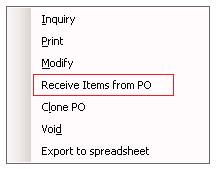
Select Receive Items from PO, and it will open the selected purchase order.
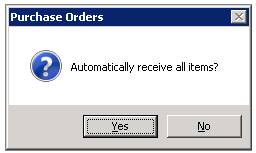
You will have the option of selection all items by answering Yes or you can choose individual line items to be received by selection No.
•Note: A header record is a place holder to indicate the total qty owned of a rental or sales item.
Receiving header items - If you have put a rental header or sales header on the purchase order, when the items are received in, a duplicate copy of the item file header record will be created with a # or a - symbol, indicating the new item record is going to be either a serialzied item or a store location.
Ex. If your header record is called WIDGET, the the serialized record will be called WIDGET #01 or WiDGET-1
# - Serialized Item * Note: If there is more then one qty received, then the serialized records will be created in sequence #01, #02, #03.
-1 Store Location * Note: If there is more then one store lcoation, then you will be asked what store location to enter the inventory -1, -2, -3 (if multistore)
* Note: Once all items have received in,you can enter the sales tax, shipping charges, or miscellaneous charges for the purchase order. Those charges will be distributed to the extra charges for each line item on the purchase order. The amount of extra charges attributed to each line item will be the price each divided by the purchase order subtotal. That number is then multiplied by the tax amount plus shipping charges plus miscellaneous charges.