Quote Import
Trends show that mobile access has become the standard for today’s customers. Make sure your website is easily navigable by mobile devices anywhere, anytime! This expanded offering of our integrated web design service uploads your inventory daily from the Point-of-Rental software to your website. Complete with a shopping cart, the site is optimized for mobile devices. The intuitive touch screen interface gives customers the ability to search your online inventory without having to zoom in and out, plus they can call your store or get directions automatically from the website. Don’t ignore the importance of going mobile! As more and more customers navigate the web with mobile devices, it’s imperative to ensure there’s nothing holding them back from using your website.
Overview: One of the numerous benefits of the Point-of-Rental Website Module is the Web Quote Import feature. A customer can submit a quote from your integrated website right into your counter system. Terminals can also be placed in your store with your website up for customers to write a quote for themselves instead of standing in line on a busy day.
After entering in your ID, from the upper left-hand corner of the Counter System Main Menu, click Tools>Web Quote Import. This will bring up a window with all currently pending quotes that have yet to be imported. Select the one you wish and click OK.
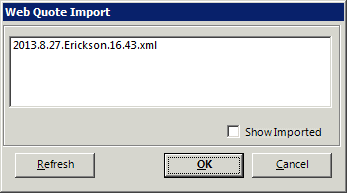
Note* to clear a web quote from the “To be imported list”, import the quote and simply hit cancel in the contract processing screen.
Point-of-Rental will then check if the phone number the customer used matches any records. If two customers share that same number as their primary number, a list of results with any customer with that phone number will display in search results and you can choose the customer you want. If there is no record it will ask the question below: Click Yes. If you click No, the customer Quote from Web will be selected instead.

You will then be taken to the customer record with the information they filled out online populated in the correct fields. The customer is not asked for their driver’s license info and at that point you can scan their license if you have it in front of you.

Click OK and you will be taken to the contract processing screen with the correct items and rental length. By default, the status is a quote but the Change Status button at the top allows you to change it to an open contract or a reservation