Pricing Tab
Left clicking on the Pricing tab will display fields on that tab.
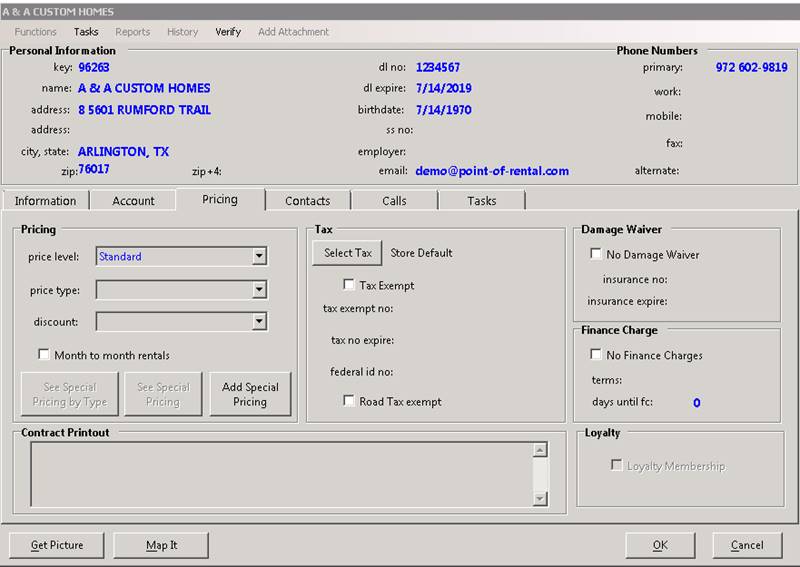
Price Level – Allows you to set different pricing level for the customer on a contract. (Price level, A, B, C). A discount percentage can be defined by each pricing level.
Price Type - Allows you to select a pricing type based on discounts given. You can group types (Best Customers, Good Customers, Linen Discount). Setting different discounts per type.
Discount - Allows you to set a discount for this customer. When any contract is created, a discount will appear under the discount column. You can set different types of discounts. (10% Rental, 20% Sales,).
Month to month rentals – This option will allow all monthly rentals for this customer to go for an entire calendar month even if the item record is marked to bill for a 28-day month.
Add Special Pricing – This option will allow you to set special pricing for items for this customer.
Contract Printout – If there is some message that must print out on each of the customer’s contract, you would enter that message in this field.
TAX – Defines whether sales tax will be charged on customer’s contracts.
Tax Exempt – Checking this box will mark the customer as TAX EXEMPT. No sales tax will be charged on the contracts.
TAX Exempt No – Allows you to enter the customers TAX EXEMPT number in this field.
TAX No Expire – Enter the date when their TAX EXEMPTION will end.
FED ID No – Allows you to enter their Federal ID number into this field.
ROAD TAX – Checking this box will not charge any road tax on any of their contracts.
Damage Waiver – Defines if Damage Waiver will be charged to the customer’s contracts.
NO Damage Waiver – Checking this box will not charge any Damage Waiver on customer’s contracts.
Insurance No – Allows you to enter customer’s insurance number in this field.
Insurance Expire – Enter the date when their insurance policy expires.
Finance Charge – Defines if Finance Charge will be charged to the customer’s invoices.
NO Finance Charge – Checking this box will not charge any Finance Charge on customer’s contracts.
Terms – Allows you to enter Net terms to pay invoices. (Net 30, 45 days)
Days until Finance Charge – Enter number of days until finance charge will start accruing