Item Record Types
Overview: When creating an item file record, there are many types you can choose to identify how the item will perform on a contract. Below is a list of the different types of items you can choose to
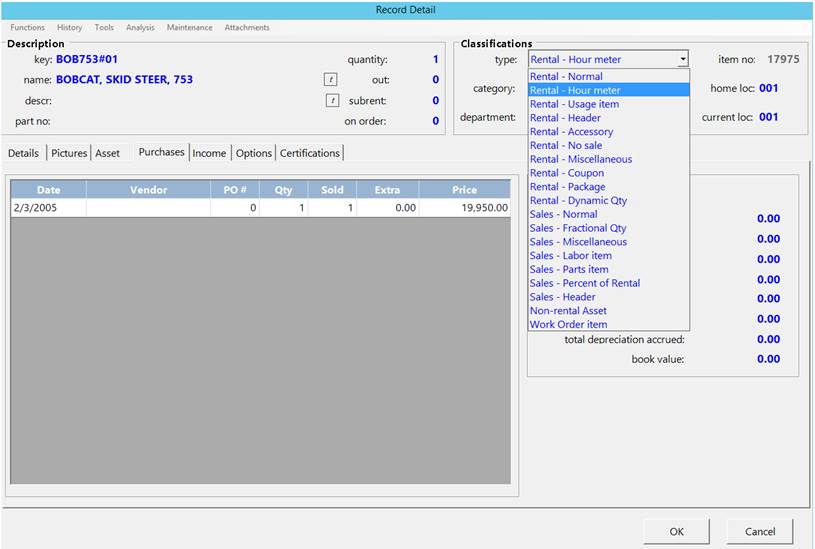
Rental Items – Items that will be entered on contract as rental inventory items, using the (hour, day, week, monthly rates)
Rental Hour Meters – Items entered on a contract will calculate charges based on the maximum of meter-hours used or the clock hours rented out.
*Note: If you do not want to see the meter hours printed on the contract, enter NOHOURS in the bin location field on the item file record.
Rental Usage – Items entered on a contract will calculate rent as well as a usage charge on a per unit basis. Ex. (Diamond Blades, Helium, Mileage, etc.)
Rental Header – is used to group like serialized items together. The rental header item would be rented on a reservation contract and when the contract is Sent Out, the counter person would be prompt to select the serialized item that is sent out.
Rental Accessory - Item is designed to rent an item either for your normal rates or for free.
Rental No Sale – Item that may be rented but not sold such as items that you have on consignment should have Rental /Sale items.
Rental Miscellaneous – Items designed to be rented that are not in your inventory.
Rental Coupon – Item gives away to offer a credit on a customer contract and have it reduce rental instead of sale income.
Rental Package – Item gives way to group a package item. The components of the package are listed in the Item Kit.
Rental Dynamic Qty – Items pieces give way to dynamically compute the quantity available based on the quantity required of items in the package.
Sale Items – Items that may be sold but not rented. Ex (Blades, sandpaper, parts).
Sale Fractional Qty – Items is designated to sell items such as fuel in tenths or hundredths.
*Note: When selling a Fractional Item, you will be allowed to enter a decimal value.
Sale Miscellaneous – Item will query you for a quantity, sell price and you will be able to type the name of the item selling.
Sales Labor- Item is used to charge labor to Work Order or Internal Repair Order. When the Sales Labor item is selected, the counter person is prompted for date labor is performed, as well as print that on the contract.
*Note: If you do not want to see labor date on the contract. Enter NOHOURS in the bin location field in the item record.
Sales Parts – Item that is used for repair parts should have an item type of Sales – Parts. The sale price for the parts is the same as regular sales items.
Sales Percentage of Rental – Percentage Sale Item charges a percentage of the line item directly above it on the contract.
Sales Header – Item is used to group like serialized sale items together. When the Sales Header item is selected, the counter person is prompted to select the serialized item that is being sold.
Non-rental Asset – Item is used for item that you want to depreciate and keep track of purchase price and dates: however, the item is not a rental item. Ex. (Office equipment, Shop fixture)
Work Order Item – Work Order Item is used for items that are added to Customer work Order contracts.