Item Rates
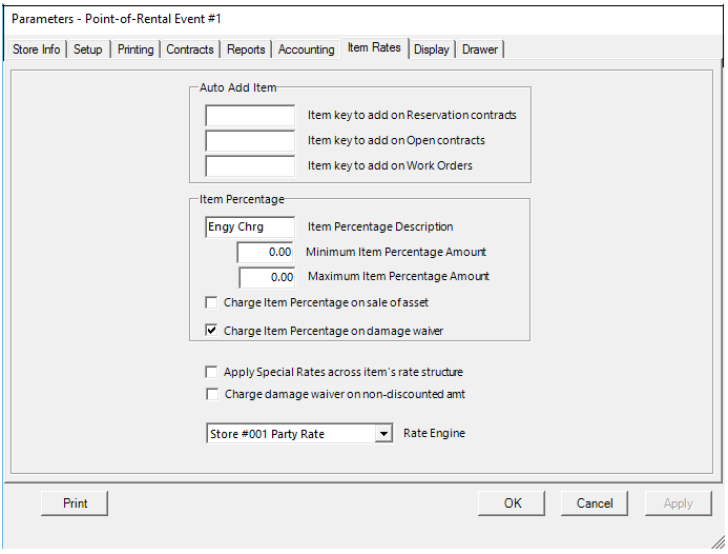
Auto Add Item:
Item Key to add on Reservation contracts – This is the key of the item that is to be added on to every Reservation contract written.
Item Key to add on Open contracts – This is the key of the item that is to be added on to every Open contract written.
Item Key to add on Work Orders – This is the key of the item that is to be added on to every Work Order written.
Item Percentage:
Item Percentage Description– This is the description for any item percentage charge. This charge is defined in each item record as a percentage of amounts charged. This field can be used to charge GST in Canada, road tax, EPA fee, or any other percentage based fee. The name entered here will be displayed on the item record and the contract and printed on reports and the contract.
Minimum Item Percentage– This is the minimum amount (in currency value) you want to charge.
Maximum Item Percentage– This is the maximum amount (in currency value) you want to charge.
Charge Item Percentage on Sale of Asset – With this option checked, the item percentage will be charged whenever this item is sold. With this option unchecked, the item percentage will not be charged on the sell amount.
Charge Item Percentage on Damage Waiver – With this option checked, the item percentage will be charged on any damage waiver amount charged on this item. With this option unchecked, no item percentage will be charged on the damage waiver.
Special Rates use Item’s Rate Structure: Allows special rates to follow the item record’s rate structure. For example, if you had an item rate structure of $100 – 1 day, $150 – 2 days, and $180 – 3 days, setting the special rate of $80 for a day will also update the item rates to be $120 – 2 days, and $148 – days. For your items only have a minimum, day, week, month structure, the parameter will make no difference.
Charge Damage Waiver on non-discounted Items - If this box is checked, then Damage Waiver is discounted along with the regular rental rates regardless if there is a discount on the item.
* Note: Warning, checking this box, and then modifying a closed or completed contract will remove the discount from the damage waiver, only calculating the discount on the regular item record.
Store Rate Engine– Allows you to select from drop down field the type engine to assign to the item rates. (Normally will be Default, Store 1 or another store’s location).