Information Tab
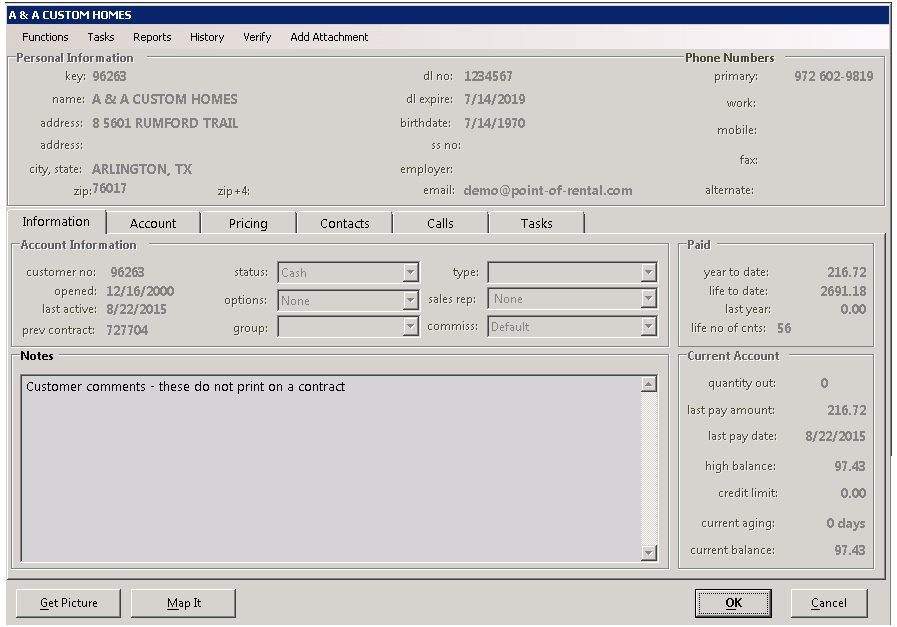
Customer No: Number assigned by Point of Rental when customer record is created.
Opened: Date customer record was created.
Last Active: Date when customer place last order.
Previous Contract: Displays last contract number customer placed.
Status: Allows you to select status of customer (Cash or Account)
Options. Allows you to select different options about the customers (No Checks, Pay on Return, Pay on Open, Credit Hold). You can also enter alert options (Wanted, Undesirable). When creating a contract a message will appear, to let you know the status of the customer.
• Note: Customers marked as undesirable or wanted. The Notes screen in the customer record will turn red.
Group: Allows you to further define customers by a particular group (Referrals, Internet, etc.)
Type: Allows you to select a type of customer (Home owner, Corporate, School)
Sales Rep: Allows you to assign a sales rep to the customer.
Commission: Allows you to set the type of commission assigned to the customer (5-year Account, House Account, Corporate Account)
Income -
Year to Date: Displays the total income for the current year.
Life to Date: Displays the total income since the customer was created.
Last Year: Displays the total income for the previous year
Life No of Contracts: Displays total number of contracts, customer has placed since they were active.
Current Account -
Quantity Out: Displays the total number of rental items on all contracts currently in an open status.
Last Paid Amount: Displays the amount the customer last paid
Last Paid Date: Displays the date the customer last paid
High Balance: Displays the highest balance the customer has on their account.
Credit Limit: Displays credit limit customer has set on file
Current Aging: Displays the number of days the customer has balance due
Current Balance: Displays the amount the customer currently has outstanding