History
Transaction History – This report shows all the contracts written for this customer. The contract number, status, date out, date in, completed date, rent, sale, and total amounts will be displayed for each contract. The report will look like the following:

Transaction Edit History – This report shows all the transaction edits for this customer. The date, contract number, action, status (first position is the contract status before change; second position status after the change), operator name, total amount changed, paid amount, pay method, deposit paid, and deposit method. The report will look like the following:
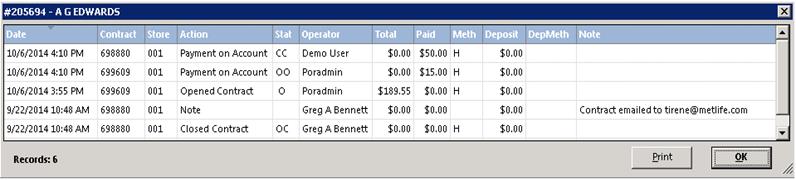
Transaction by Date – This report will list all of contracts for the customer grouped by month.
Transaction by PO Number – This report will list all of contracts for the customer grouped by Purchase Order Number.
Transaction by Job Number – This report will list all of contracts for the customer grouped by job number.
Transaction by Contract Info – This report will list all of contracts for the customer grouped by Contract Info.
Payment History – This report shows all the payments this customer has made. The payment number, contract number, payment date, amount paid, payment method, and reference number (i.e. check number or credit card number).

Note: If you click on the Payment Number of a credit card payment, you will be asked whether to reprint the credit card receipt. This option is only available if you use the Integrated Credit Card module.
Income History – This report shows the monthly rental/sale total as well as the number of contracts written. By selecting Rental Income, only the customer’s rental amounts will show. By selecting Sales Income, only the customer’s sales amounts will show. The report will look like the following:
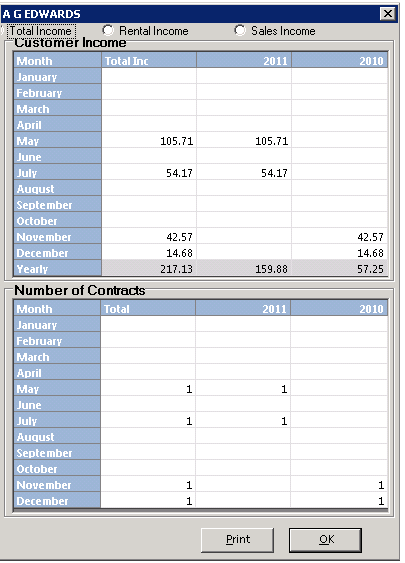
Note: You can drill down on any month to see the contract details that make up that number. Simply click on the desired month to see the detail.
Year Income by Category – This report shows the current year income breakout by category. The report will look like the following:
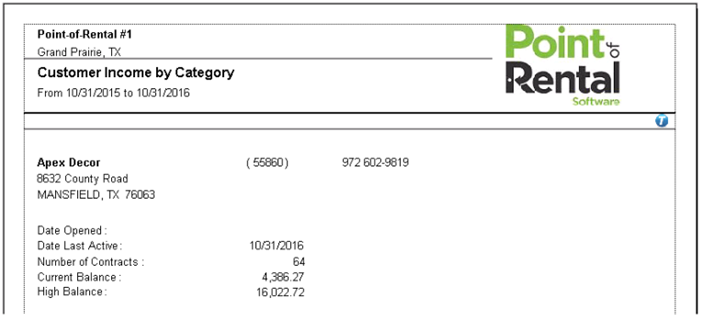
Lifetime Income by Category – This report shows the lifetime income breakout by category. The report will look like the previous report.
Customer Edit History – This report shows all the edits that have been done to this customer’s record. The edits include adding the record, deleting the record, changing the key, credit limit, restrictions, status, or income. The report will look like the following:

Item History Detailed– This report shows the history of items the customer has rented from you.
