Email Letters
This feature allows you to create different stock email letters for each contract status. Whenever you email a contract, the default letter from Parameters will be inserted. You will be able to select one of these customized letters from the drop-down menu in the upper left that lists all the available letters by contract status.
Letters that can be created: Closed, Open, Quote, Work Order, Purchase Order, Payment Receipt, General, Letter, and On Hold

Add Button: Clicking this button allows for adding a new email letter.
Delete Button: Any letter with a blank description will be deleted, once this button is clicked.
Purge Button: Any letter with fields blanked out will be deleted, once the button is clicked.
When adding a new email letter, you will see the following screen:
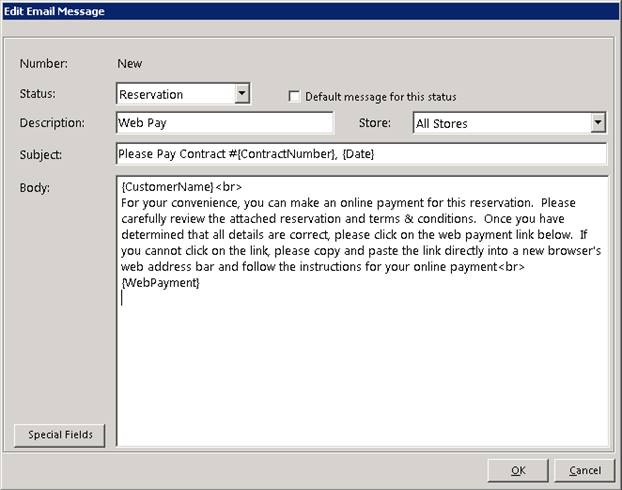
Status – Choose the contract status you want to associate this email letter with. You can choose from: Quote, Reservation, Open, On Hold, Closed, Payment Receipt or General.
Description – This would be the name of the email letter you are creating.
Subject – Default email subject line.
Default message for this status – You can select which method (Quote, Reservation, Open or Closed) to be your default message.
Body – Default email body line.
*Note: The system will automatically insert the Email Body that is typed into Parameters for each contract status; Quote, Reservation, Open, etc. However, if for some reason you totally blank out those defaults in Parameters, then the system will automatically put in "Invoice ##### attached". If you don't want that message, then enter something in Parameters.
Special Fields – You can use any of these special fields to have the system auto fill in information pertaining to the customer and customer’s contract. Ex. Entering {Customer Name} special fields item into the body of the email will display the Customers Name in the email body when emailing a customer.

•Note- Point of Rental does not store emails, you can set up a blind carbon copy (bcc) to have a copy sent to your inbox.