Default Vendor Markup
How to get there: Program Menu > Configurations > Accounting Configurations > Default Vendor Mark Up
You can define a default markup percentage whenever you are purchasing new items. This is especially helpful for special order items and the markup will automatically be computed for the counter person based on the cost of the item. The default vendor markup will only be used if the specific vendor chosen has no markup defined. Once selected, you will see the following screen:
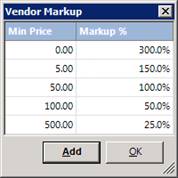
Enter the minimum price and the associated markup that you want for that price range. For example, with the above default markup, a new item entered with a purchase price of $6.00 would automatically set the sell price to $15.00 (150% markup)