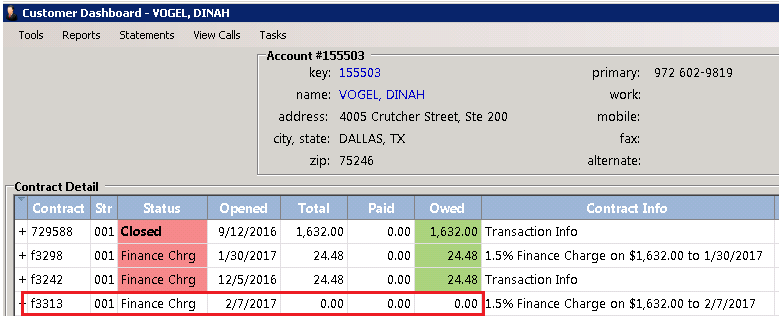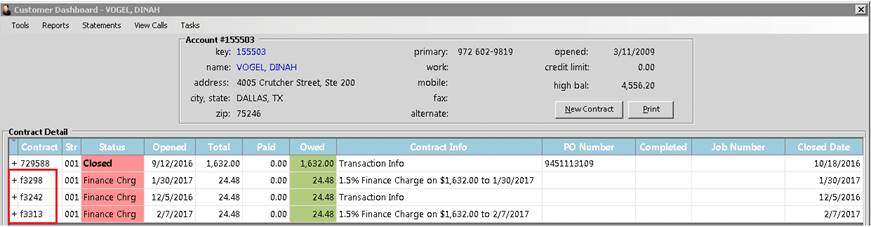
Finance charges can be written off from either Program Menu>Account Receivable>Account Payments or Counter System>Customer Dashboard.
Enter the Customers Name, most recent contracts will show under the contract details. Along with any open, closed, reservation or quote, you will see contracts starting with the letter “f” to indicate this is a finance charge accrued when statements were run.
You can write off a finance charge, by right clicking on the contract number starting with the letter “f”. in this example we will write off finance charge contract f3313. A box will appear to give you the option to write off the contract.
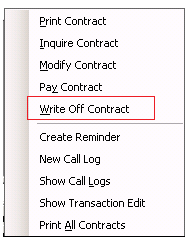
Once you select write off Contract, the finance box will appear showing the contract number. Ex. f3313. This will list the amount of the finance charge and any amount that was paid towards the finance charge amount, along with the total amount due. You will be given a message to write off the finance charge. Select either Yes or No.

If Yes, was selected, the finance charge will be written off. You can go back to the customer Dashboard and see under the contract details the finance charge has been written off.