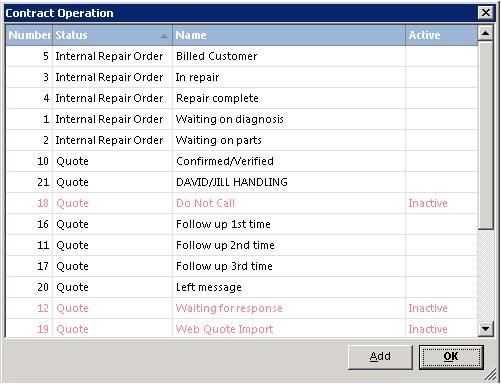
TransactionOperations can be setup allowing you to have sub-status’ for different contract status’. To setup your Transaction Operations go to Configuration and thenTransaction Operations. An example for reference is your IRO’s and Work Orders can have sub-status’s setup called “Waiting for Parts” or “Repairs Completed”.This allows you to update the contract and keeps everyone informed of the contract status as each process for that contract is completed.
To add a new contract operation click the add button. Fill out the appropriate fields.
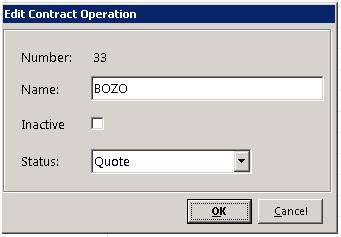
Name: Operation Name
Inactive; Check this box if you want to mark the operation as inactive
Status: Select from the drop down menu, which operation this will be assigned to. (Regular Contract, Quote, Work Order)
From inside the contract:
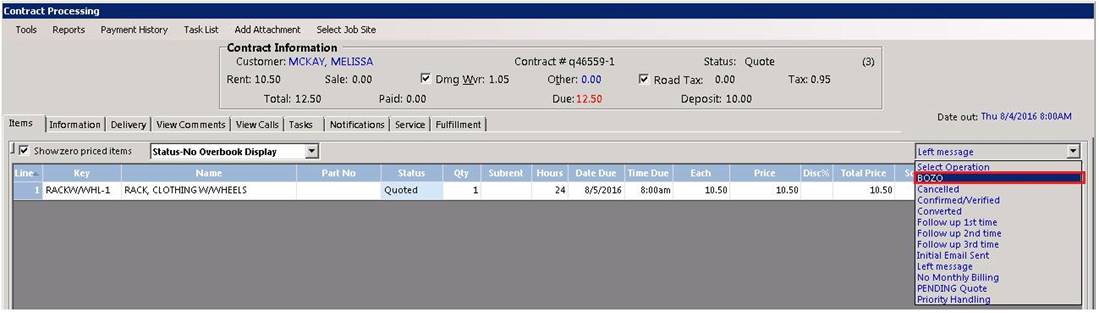
From inside the contract, you can select the operation, from the drop down menu on the left side of the contract.
* The transaction operation created will only show under the appropriate contract status where operation was set. (Quote, Regular Contract).