•Note – Depending on which type of contract you are in, you will have different options available to you under the Menu options.
Set Credit Card: This option allows for a credit card number to be stored for this contract only. When the contract is finally paid with credit card as the payment method, the credit card number entered into this field will automatically be used.
Change Contract’s Store: This option allows you to transfer a contract from one store to another. If the contract has already been posted to totals, those totals will not transfer. They will stay with the store that originally wrote the contract.
Change Bulk Items Store:
Add Asset Sale This option allows you to add an asset sale item to your contract.
Pull All Items: This option allows you to pull all of the sales items out of inventory.
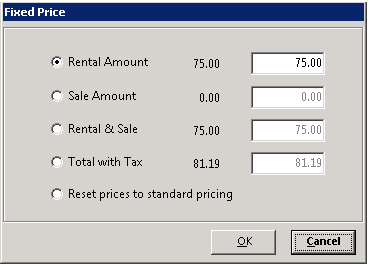
Set Contract Price: With this option you can enter a fixed price for the Rental Amount, Rental & Sale, or the Total Amount with Tax. The computer will compute the line item difference between the original price and the new price and enter that into the line item discount.
Track Shipments This option will allow you to track shipment of order (UPS, FedEx)
Export To Spreadsheet: This option allow you to export your contract to a excel spreadsheet.
Modify Contract: This option will allow you to make modifications to a contract. ( Only from within Inquire Contract)
Void Contract: This option will allow yout to void or cancel the contract.
Send Out Reservation: This option will allow you to send out the reserved contract to an open status.
Posted to Totals: This option will print each time that the store’s totals were updated from this contract.