
Before you are able to export your time clock entries into QuickBooks you need to make sure you properly setup to do so. Follow these steps:
1. Go to #10 Security
2. Go to Operator ID’s
3. Open each of the Operator ID’s
4. Select Employee’s Pay Type
6. Also in the employee Record you must know and enter the employee name for each export that is to happen to QuickBooks.
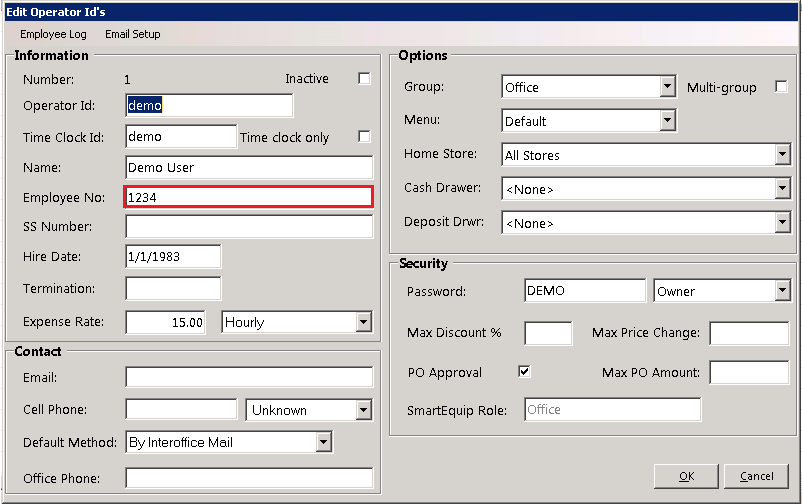
*Note: It must match exactly, including spaces and punctuation or it will automatically add the name as a new employee during the import. Using a Comma in the name means it is in the ‘Last name, first name’ format.
7. Enter the Value into the Regular, Overtime, and Double-Time field under Pay Types.

8. Go back to the Program Menu.
9. Go to Time Clock #18.
10. Go to Addition Codes

11. In the Addition Code window, click ADD or click on one of the current codes already listed. Fill in the data to match QuickBooks exactly or it will stop on each wrong payroll item being imported, forcing you to select the correct one and unfortunately making it very easy to enter a wrong date. Any field left blank in Point-of-Rental will NOT be exported to the import file.
12. Go to QuickBooks.
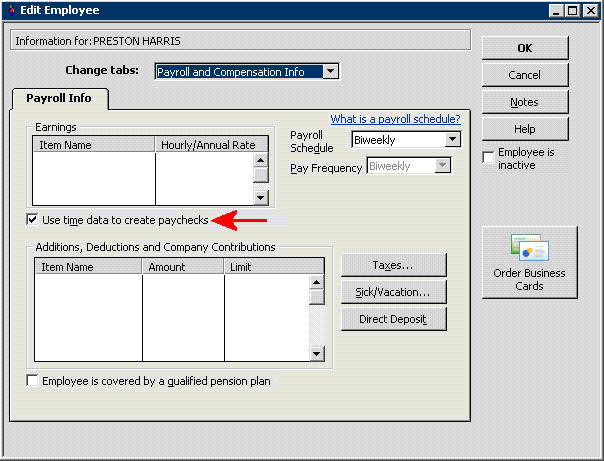
13. On the employee information | Payroll and compensation info for each employee record, the “Use time data to create paycheck” must be checked so that the imported data can be used for payroll.
14. On the main screen click EDIT on the tool bar, click on Preferences, then General. Choose Company preference tab. Time format, Set to Decimal.

15. On the Main screen click EDIT on the tool bar, click on Preferences, then Time a Expense. Choose Company Preference Tab. Do you track time? Set to yes. First day of work week, set to the first day of the work week you set in Point-of-Rental under Configuration, Parameters, Accounting Tab.

NOTE: Deleting wrong import entries is a slow process; it must be done one timesheet at a time.
CONTACT
Email – This is the employee’s email address
Cell Phone – This is the employee’s cell phone number and provider
Default Method – This is the method that this employee would like to be contacted when someone sends a message to them.
