
Overview; Styles allow for up to three unique attributes to be defined in each item record. The style name is defined in the category while the style is defined in each item record. Styles were added to make web navigation more intuitive but can also be utilized in the inventory selection screen with the program.
Examples:
An Event Store can add styles for their lines such as fabric type, color, size, etc
Tool rental stores could add styles to their trenchers by trench width, depth, etc
1. Configurations>Item Configuration>Item Categories. Select a Category
2. In File Maintenance>Item File, select item.

3. Enter an attribute for each style defined.
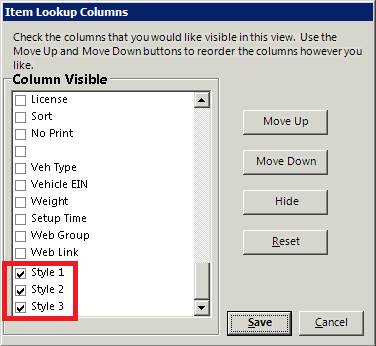
4. In any inventory select screen, right click on the column headings and turn on the Styles. This way items can now be sorted by styles, as well as name, part number, etc…
5. Using Field Search, Items can also be searched by their style as well.