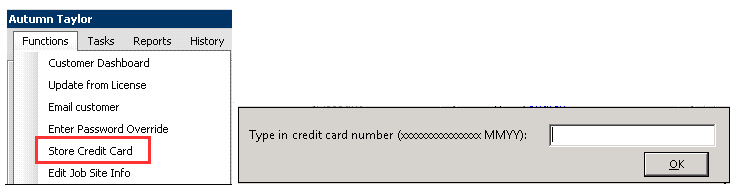
If you use eTim/VeriFone terminals this number cannot be automatically used. You should refer to the Open Credit Card method to store a card number for future use.
• In a customer record you can store a credit card in the Options Drop Down Menu. This would be a sixteen digit number followed by a space an then the two digit month and two digit year.
• In a transaction/contract you can store a credit card in the Tools Drop Down Menu.
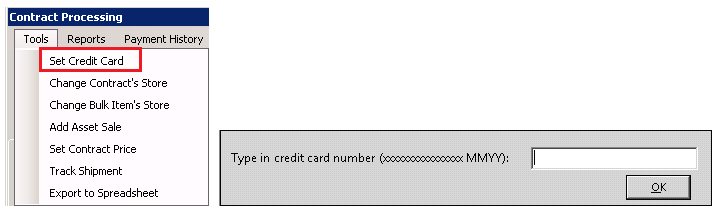
•Note: You must have higher than inquire set in file and field security in order to store credit card numbers. If not the stored Credit Card will be grayed out.
Using either of these methods does not guarantee funds or verify the number was typed correctly.
Open Credit Card Payment Type: Although you can store credit card information as described above, it is recommended that you use the Open Credit Card payment type to store a credit card number. This must be turned on in Parameters. Open Credit Card is used in the payment screen in place of taking a payment and cannot be used if you are taking a payment or deposit or have already taken a payment or deposit. This method allows for future use of the credit card, validates the credit card number (eliminating data entry mistakes), and checks to make sure the account is valid and open.
Pre-Authorizations: Point-of-Rental does NOT allow for pre-authorizations for a number of reasons. Mainly due to the limited amount of time a pre-authorization is valid for and the time processors take to release funds back to the customer when a pre-authorization is cancelled. This becomes very problematic today as most people are using debit cards linked directly to their checking accounts.
Refunds: Refunds are processed during your end of day process when the credit card batch is sent to your processor (typically when you close each day). Processors generally release refunds to the issuing credit card (your customer’s credit card company) within 5 days. The issuing credit card typically posts credits to the customer’s account within 10 days.
Purchase Orders: Every credit card transaction will pass a purchase order to the processor if a purchase order number exists. Special Characters can not be used in the purchase order field. If a special character is in the field you will receive an error most likely stating “invalid customer code.”
This is a result of the processor not being able to process with a special character in the field.
Turn Off Historical Listings for a Store or a Customer
• From Parameters>Configuration>Store Configuration>Parameter>Drawer tab, you can completely turn off credit card history for a store.

• Not saving credit card info will force you to swipe or ask the customer for the number each time you need to make a charge to the card.
• From a Customer Record you can turn off credit card history.
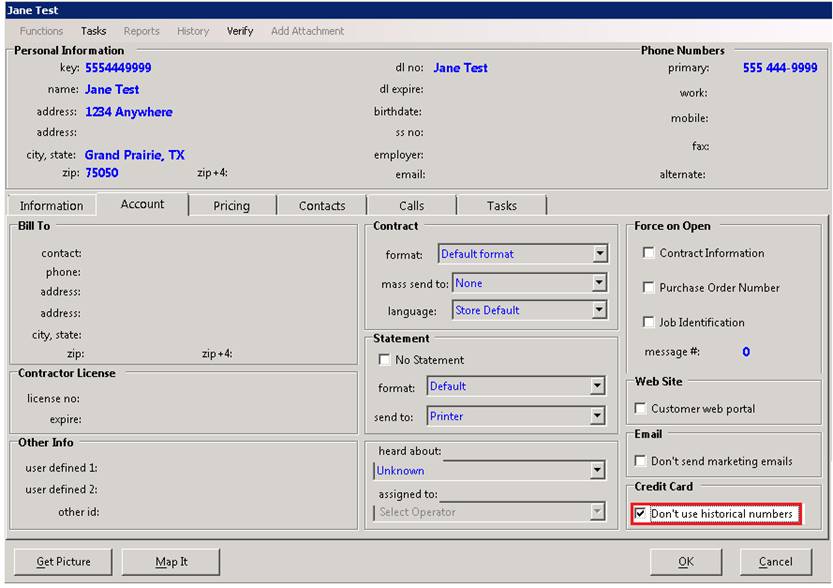
• Not using historical numbers will force you to swipe or ask the customer for the number each time you need to make a charge to the card.