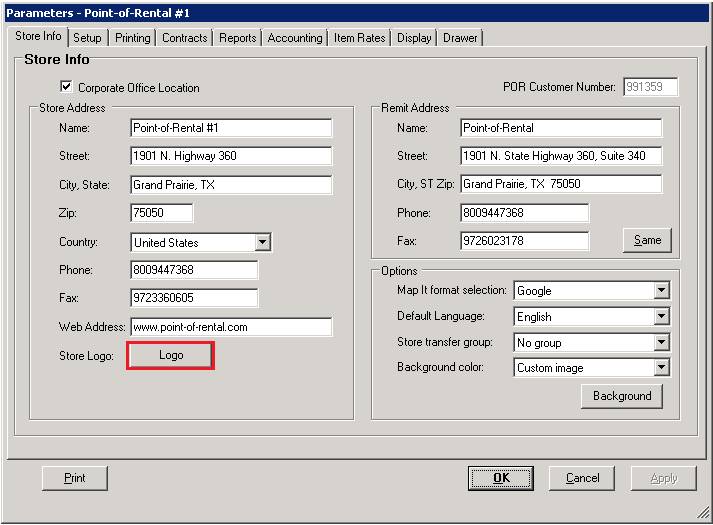
Corporate Office Location – With this box checked, this store will operate as the corporate office. It will be able to print most accounting reports for all stores or for a particular store.
POR Customer Number – This is your internal customer number used for licensing purposes.
Store name- This will appear on all reports and on the counter system MAIN MENU screen. It is centered automatically.
Store street address- This will appear on the charge statements as well as most reports. It is centered automatically.
Store city,state –This will appear on the charge statements as well as most reports.
Store ZIP Code- This will appear on the charge statements.
Store phone number- This should be in the format aaannnnnnn, where aaa is you area code and nnnnnnn is your phone number. It will be printed on the charge statements.
Store fax number-This should be in the format aaannnnnnn, where aaa is your area code and nnnnnnn is your fax number. It will be printed on the charge statements.
Store web address–This address will be printed on your contract forms.
Logo – This button allows you to store your company logo in the database. It can then be used on your printed contracts and reports. (see contract formats)
Remit name- This will appear on statements and most letters.
Remit address - This will appear on the charge statements as well as most letters. It is centered automatically.
Remit City,ST ZIP – This will appear on the charge statements as well as most letters.
Remit phone number - This should be in the format aaannnnnnn, where aaa is you area code and nnnnnnn is your phone number. It will be printed on the charge statements.
Remit fax number -This should be in the format aaannnnnnn, where aaa is your area code and nnnnnnn is your fax number. It will be printed on the charge statements.
Map It format selection– This option allows the selection of the driving directions service. The options are MapQuest, MapQuest Map Only,Google, MSN Maps, or Yahoo.
Default Language– This allows you to choose different languages from the drop down to use within the Point of RentalSystem.
Store Transfer Group– This allows you which groups you can transfer equipment to and from. No group allows you to transfer to all groups.
Background Colors– This allows you to change the background color of your screen inside point of rental