1. Stipulations
•Customer must have SalesForce.com Professional edition or higher.
•Data is harmonized hourly for any transactions executed during the previous hour
•SalesForceSync pricing is by SalesForce.com ID.
•Sales persons must have logins in Point-of-Rental® and SalesForce.com – email address is a required field.
•Customers must be assigned to
selected sales persons when created in Point-of-
Rental® to be uploaded into
SalesForce.com.
•SalesForce.com Accounts must be assigned ownership to selected sales persons to be downloaded to Point-of-Rental®.
•SalesForceSync scope is for customer interactions moving forward. Historical or past customer, contact, call log and contract creations and updates are not included.
1. Sync Details
Point-of-Rental Customer/SalesForce Account
•Send customer data from SalesForce.com to Point-of-Rental®
•Send customer data from Point-of-Rental® to SalesForce.com
•New and updated customers put in sync between SalesForce.com and Point-of-Rental®
•Customers must have a city, state and ZIP to be synced
Point-of-Rental Authorized user/SalesForce Contact
•Send contact data from SalesForce.com to Point-of-Rental®
•Send contact data from Point-of-Rental® to SalesForce.com
•New and updated contacts put in sync between SalesForce.com and Point-of-Rental®
•Point-of-Rental® contacts must have either phone number or email address entered to be uploaded into SalesForce.com
•
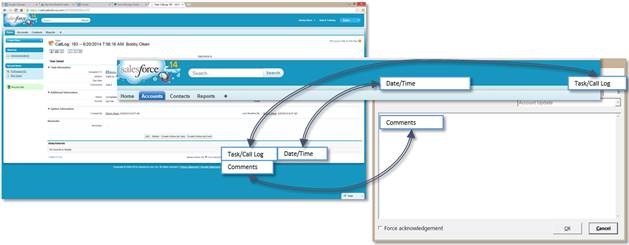
Point-of-Rental Call Log/SalesForce Task
•Send task data from SalesForce.com to Point-of-Rental®
•Send call log data from Point-of-Rental® to SalesForce.com
•New Point-of-Rental® call logs uploaded into SalesForce.com and new SalesForce.com tasks downloaded to Point-of-Rental®
•SalesForceSync does not perform updates of Point-of-Rental® call logs or SalesForce.com tasks
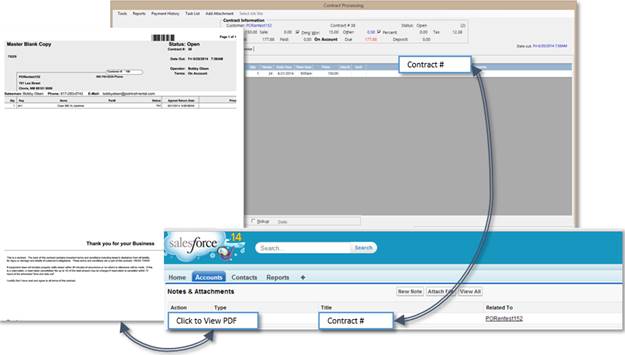
Point-of-Rental PDF Contract
•Send Point-of-Rental® contract PDFs to SalesForce.com
•New, modified and closed Point-of-Rental® contracts uploaded into SalesForce.com as attachments on the Account record
•The current contract modification is synchronized to SalesForce.com (not contract history)