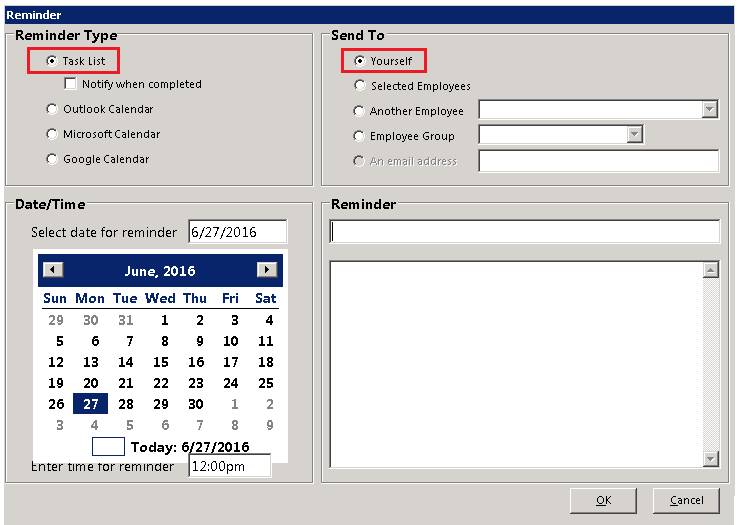
From the Reminder page, you can create a reminder using Point-of-Rental's internal Task List, Microsoft Outlook, Microsoft Calendar or Google Calendar. The reminder can be created yourself, for an employee, an employee group. or for anyone with an email account. when you select reminders you will get the following screen:
Reminder Type - This is the method you will use to send the reminder.
Date/Time: This is the date and time you want the recipient to receive the reminder.
Send To: This is where you choose the recipient: Selected Employees, Another Employee and Employee Group are both pull down menus.
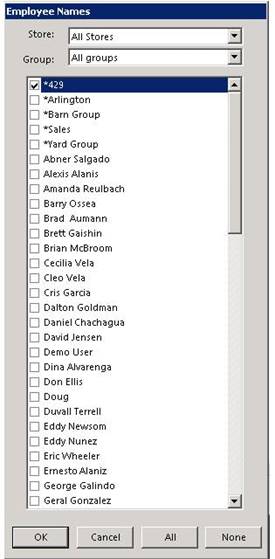
When selecting employee and clicking on the ok button, the list of employees will appear.
Store: From the drop down menu, you will have the options of selecting all stores or a individual store.
Group: You can select different groups types (Office, Drivers, etc)
Select the individual or individuals to send the reminder too. Once checked, click on OK the reminder will be sent.
Reminder- This is the subject line and the body of the reminder.
*Note: When you have a Task or Reminder that is due, a BOLD RED link will appear in the bottom right corner of the Counter System Menu. Also, when creating a task for someone else and you want to know when that task has been completed, check the “Notify When Completed” box and you will be informed via a POR internal email message upon completion