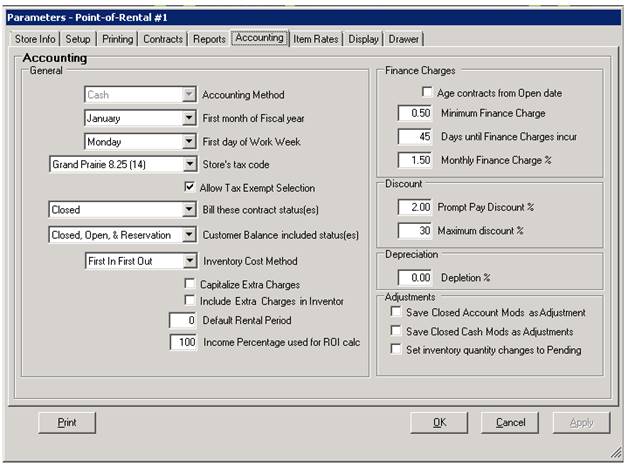
Overview: Allows you to give good customers a discount for paying their bills on time. You can set a percentage to be added to the payment in order to reduce the amount of the invoice being paid.
To set prompt pay discount, go to program menu>Configurations>System Configurations>Parameters>Accounting Tab>Discount
Under Discounts enter the amount of the Prompt Pay discount you want to give to your customers.
When paying the contract, you can pay either through Accounts Receivable or Customer Dashboard. If paying through Customer Dashboard, go to Counter System>Customer Dashboard>Tools

From tools, select make a payment. The payment screen will appear, enter payment amount of the (check, cash, credit card) payment.
Once payment is entered, the prompt payment screen will appear. This will allow you to enter the amount of prompt pay amount.
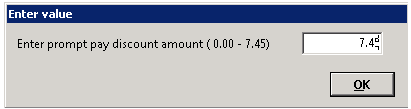
* Note – Point of Rentals will take the percentage amount entered in parameters under the Prompt Pay Discount and times it by the amount owed.
Ex. In example above, customer owes $372.11. There is a 2% prompt pay discount. Or up to $ 7.45 that would be credited towards customer invoice. This amount will be added to the payment amount being added towards customers account.
You have the option of applying the full amount or particle amount towards the customers invoice.
* Note - There may be times you might not want to give a customer the full prompt pay discount or only give particular payment. This allows you to enter from a range of zero to the maximum prompt pay discount.

Once you enter the amount of the prompt pay you want to apply, it will add it to the check amount to give you the total in funds remaining to apply to customers invoices.
NOTE : If you are paying multiple invoices, then the prompt pay discount will apply to each one of the contracts being paid.
Reports:
You can run a customer payment report from Customer Dashboard>Reports>Payment Report. This will break down the payments and discounts applied toward the invoices.
