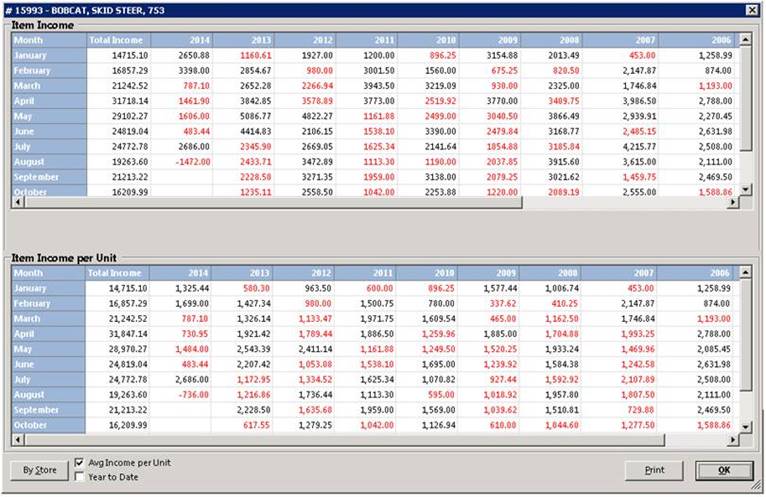
This report shows the monthly rental/sale total as well as the times rented. The report will look similar to the following:
Notes:
Income in Red signifies a decrease from the same period the previous year. Therefore, income in black would be an increase from the previous year.
You can drill down on any month to see the contract details that make up that number. Simply click on the desired month to see the detail.
By Store – this button will display the monthly income broken down by store.
Average Income per Unit – With this checked, the income will be displayed in the lower pane as a per unit amount. For example, if you had 2 units with $2,000 income on a particular month, the top pane would show $2,000 and the bottom pane would show $1,000. If you click on any month in the lower pane, the number of units owned at the end of that month will be displayed. With this box unchecked, the number of times out will be displayed.
Year to Date – With this checked only the months from January until the last full month will be displayed. The totals at the end of each year are helpful to determine trends for year over year.