
Overview: From a security standpoint it is important to control which websites your employees have access to when accessing from the server. If there are legitimate websites that need to be accessed during the normal course of business you will want to add them as trusted sites.
1. From the server log in as Administrator. You may need to consult your local IT person or your manager for access as an Administrator.
2. Open Internet Explorer, click on the Tools icon on the taskbar, select Internet Options from the pull-down menu.
3. Select the ‘Security’ Tab.
4. Select the ‘Trusted Sites’ Zone.
5. Click the ‘Sites’ Button.
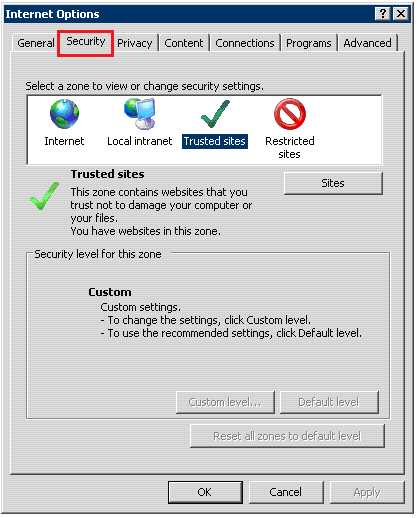
6. Enter the website name in the top text box and click the Add button.
a. It is best practice to enter the address as *.website.com as this will include all variations of the website. Otherwise, if you enter something like ebay.com, for example, you will still be blocked when you go to www.ebay.com, search.ebay.com or my.ebay.com.
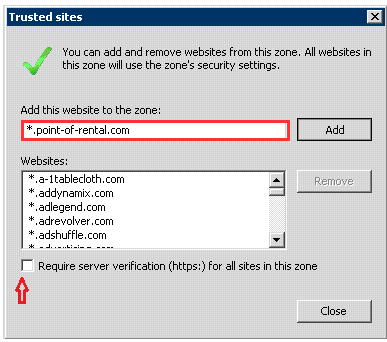
Note: The check box for ‘Require server verification (https) should be unchecked.