
Each line item on the purchase order can have a separate general ledger account number. When you add a line to the purchase order, you will have a pull down selection of available general ledger accounts.
General ledger account are created and modified using this menu item.
•Note: When ordering an item for the first time with the PO module, you will need to assign the GL account number to the line item. Once an item has been previously ordered and the GL Account number has been assigned that GL Account number will automatically be pulled from the last Purchase Order into the current Purchase Order.
From the Display Screen, select Options>GL Accounts
You will be asked to enter your ID and password, This will bring up the General Ledger Accounts. If the one you are looking for is not listed, you can create one by clicking on the add button.

A GL Account Number box will open where you can enter the description and GL Number.
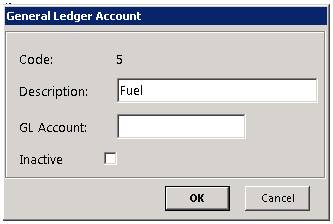
* Note: to make a GL Account Inactive, select the appropriate GL Account to open the box and check the inactive box.