
Will list the different fulfillment stages the contract from prep,loading and transport. Once each department has finished, an updated status will show under the Fulfillment tab in the contract.
If you right click on a line item, you will have the options to either Update Quantity Counts, Add Items to Contract or Sell Missing or Damage Items.
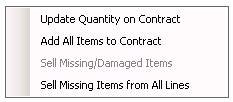
Update Quantity on Contract - This will update the prep quantities from the fulfillment module on to the contract.
Add All Items to Contract - This will add all the items prepped that are not alredy on the contract
You can select to add all items to the contract. There might be times were an item has been prepped and returned but not showing on the contract. You can select yes to add the items to the contract.

Sell Missing/Damage Items/ Sell Missing Items for All Lines- Will do an asset sale of the quantity that was missing on the contracts. You can right click on the short line, and select Sell Missing/Damaged Item. The missing items will automatically be added to the contract as an asset sale.

*Note: If you are a party company and charge damage waiver, you will be asked whether you want to bill the customer for the missing items.
Please see Net Help for more information on how Contract fulfillment works.
* Note: You would need to purchase the Contract Fulfillment module separately. Please contact Point of Rental for a quote