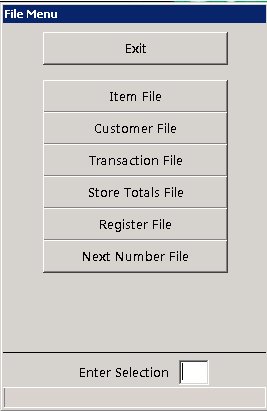
This selection allows you to establish the security level required to view and/or change the data file and each field within the data file.
First you must enter the owner's level password. In order for the changes you are about to make to be implemented at all terminals, you will need to select Quit at all other terminals. Next you will be presented with:
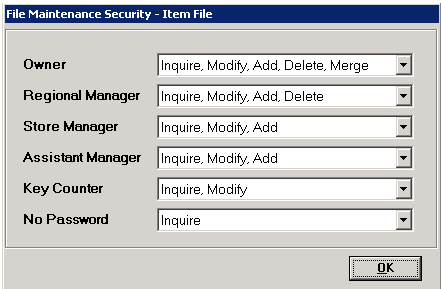
EXIT returns you to the PROGRAM MENU. The other selections specify which data file you wish to change. Next each password level will be shown along with File Maintenance functions permitted on the file. You may change the allowed functions to define which password levels may Inquire, Modify, Add or Delete records. After you have made any required changes, click OK to continue to the next screen.
Now the field numbers and names for each field of the selected file will be displayed on the screen, along with their current security levels for both data entry and display.
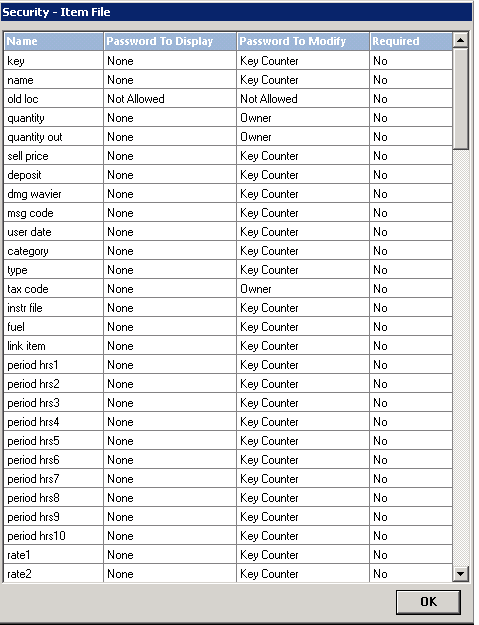
Click OK to exit to the Program Menu. Click on the desired field that you wish to modify. You will then be asked to specify the new ENTRY security code followed by the new DISPLAY security code. These codes define who can enter or view data in the field.
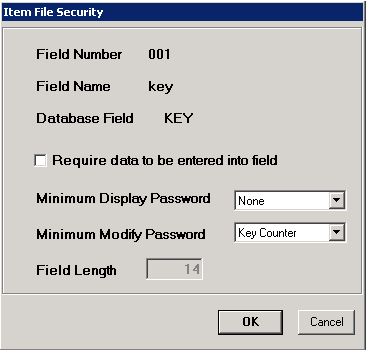
If the password level is set to Not Allowed, you will not be permitted to change it, nor will you be permitted to display/modify that field. If the password level is set to Restricted, then the field is only changeable by the POINT-OF-RENTAL™ program. After you have entered the new password levels, click OK and you will be returned to the field listing.