
This feature allows you to create different stock email letters for each contract status. Whenever you email a contract, the default letter from Parameters will be inserted. You will be able to select one of these customized letters from the drop down menu in the upper left that lists all of the available letters by contract status.
Letters that can be created: Closed, Open, Quote, Work Order, Purchase Order, Payment Receipt, General, Letter, and On Hold
Add Button: Clicking this button allows for adding a new email letter.
Delete Button: Any letter with a blank description will be deleted, once this button is clicked.
Purge Button: Any letter with fields blanked out will be deleted, once the button is clicked.
When adding a new email letter you will see the following screen:

Status – Choose the contract status you want to associate this email letter with. You can choose from: Quote, Reservation, Open, On Hold, Closed, Payment Receipt or General.
Description – This would be the name of the email letter you are creating.
Subject – Default email subject line.
Default message for this status – You can select which method (Quote, Reservation, Open or Closed) to be your default message.
Body – Default email body line.
*Note: The system will automatically insert the Email Body that is typed into Parameters for each contract status; Quote, Reservation, Open, etc. However, if for some reason you totally blank out those defaults in Parameters, then the system will automatically put in "Invoice ##### attached". If you don't want that message, then enter something in Parameters.
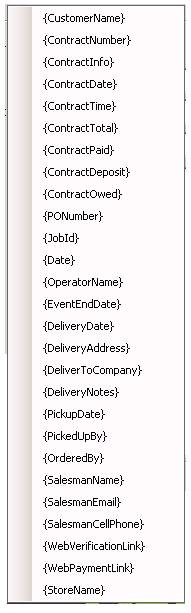
Special Fields – You can use any of these special fields to have the system auto fill in information pertaining to the customer and customer’s contract. Ex. Entering {CustomerName} special fields item into the body of the email will display the Customers Name in the email body when emailing a customer.
•Note- Point of Rental does not store emails, you can set up a blined carbon copy (bcc) to have a copy sent to your inbox.