
Overview: Using a Rental-Coupon Item to decrease the value of a contract. You can easily track donations within Point-of-Rental and on your Profit and Loss Statement if desired.
Setup a category for Discounts:
1. Program Menu - #9 Configuration>Item Configurations>Item Categories
2. Create a new category called Discounts if one does not already exist
3. Add your G/L # for Donations to the category if you want to track on your P & L
Create a Donation Rental-Coupon:
1. Program Menu - File Maintenance>Item File>Add new Item
2. Key = ‘Donation’
3. Name = ‘Donation’
4. Qty = 99,999
5. Item Type = ‘Rental-Coupon’
6. Category = ‘Discounts’ (the category you created previously)
7. Home Location & Current Location = ‘000’
8. Sell Price = -1000.00 (A negative number. Set to the amount allowed.)
9. If you want damage waiver to be reduced enter your damage waiver percentage
10. Income Tab – Select the correct G/L # if you are tracking on your P & L
11. Option Tab – Bulk Item = ’Checked’
12. If you want sales tax to be reduced do not check the non-taxable box
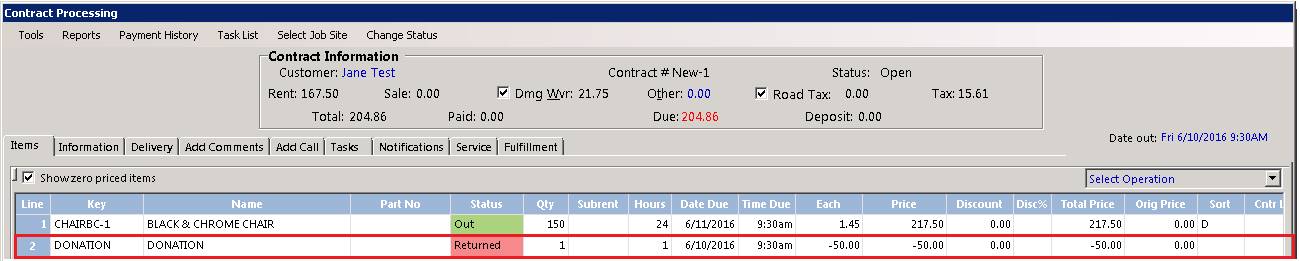
This item can be added to any contract similar to any rental or sale item with two exceptions. You will be required to specify the discount amount (make sure to type a negative number) and a comment for issuing the coupon. The overall value to the contract will be reduced by the amount of the coupon added to the contract. If your coupon is taxable it will reduce the sales tax automatically; if it has damage waiver it will also be reduced.
Tracking:
1. Program Menu – Override Reports – Coupons Given Report
2. Choose a date range and a store number if multi-store
or
3. If a G/L # was assigned you will see a posting to the account when posting your entries into your accounting software. You P & L will now show the amount of donations given
This procedure can be used to track any type of discount. Here are some examples:
1. Rental Equipment Failure Coupon. Equipment failed and you want to give your customer a credit; rather than zeroing out the item, issue a coupon. You can then track how often you are giving money back due to equipment failures.
2. Employee Discounts. Track how much rental value your employees’ are receiving.
3. Customer Satisfaction. A way to simply make a customer happy if there is no other way or reason to make them happy. Give them a credit on the contract.
Any coupon you have published or mailed to your customers