
Overview: Allows you to vew and print different types of reports for both deliveries and pickups of the daily routes.
Reports
Deliveries by Date Report - Allows you to print out scheduled deliveries by a given date range. You will able to group either by contracts or items and set different criteria for viewing this report. Report can be sorted and viewed by the following:
Sort:
Delivery Confirmation - Allows you to view contracts both the confirmed and unconfirmed deliveries.
Delivery Truck - Allows you to view contracts by assigned vehicles and route number.
Store - Allows you to view contracts by store location
Delivery Address Zip - Allows you to view contracts by Address zip code.
Delivery Trip - Allows you to view contracts by Trip Assignment, viewing the contracts in ascending order by route. ( ex. Route 123, will display from earliest to latest).
Details:
Component Items - Checking this box will show component items on the contracts when printing the reports.
Pickups by Date Report - Allows you to print out scheduled pickups by a given date range. You will able to group either by contracts or items and set different criteria to viewing this report. Report can be sorted and viewed by the following:
Sort:
Pickup Confirmation - Allows you to view contracts both the confirmed and unconfirmed pickups.
Pickup Truck - Allows you to view contracts by assigned vehicles and route number.
Store - Allows you to view contracts by store location
Pickup Address Zip - Allows you to view contracts by Address zip code.
Pickup Trip - Allows you to view contracts by Trip Assignment, viewing the contracts in ascending order by route. ( ex. Route 123, will display from earliest to latest).
Details:
Component Items -Checking this box will show component items on the contracts when printing the reports.
Truck Loading - The report gives key data about a truck’s load, warns of overweight loads and gives a pick list of item on the load.
Stop by Date Reports
Truck by Date Report

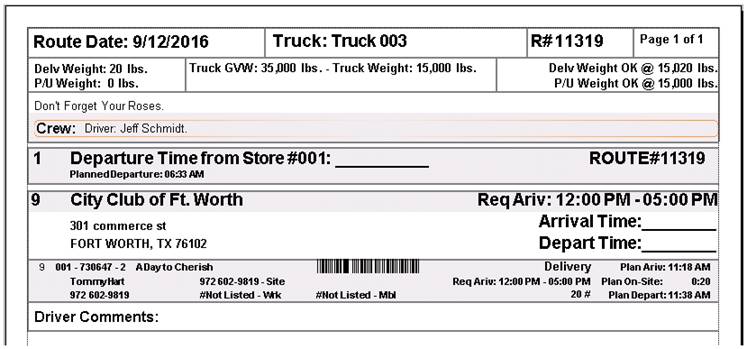
Truck Routing - The report is similar to the Load Report, but focused on the route adding stops details like sequence and stop time.
Driver Trip Sheet by Date
Route Summary Report - The report summarizes each route’s stop by stop status. The report displays trip name, truck name, route status, drivers and crew names. It will also display the Gate Time In/Out, Route Time, Total Miles, Number of Deliveries and Total Stops.
Daily Route Summary Report
