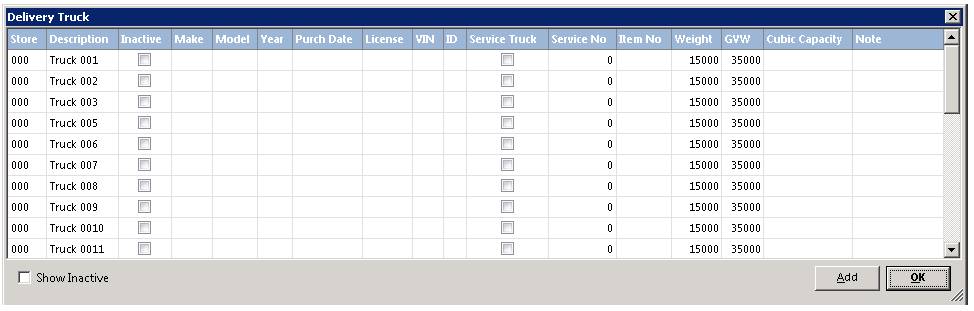
All trucks used for deliveries are defined in this section. The delivery trucks will be displayed and you will be permitted to make changes to them.
Click on the truck you desire to change or click the ADD button to add an additional truck. In either case the following screen will be displayed:
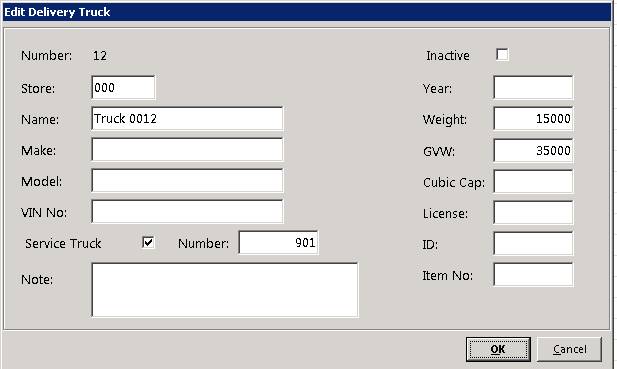
Number – If you are adding a truck, the number will be automatically assigned.
Store – A store number of 000 will allow this truck to be shared between all of the stores. A store number of 001 would only allow store 1 to select this truck for deliveries.
Name – Enter a description for the truck.
Inactive – Check this box if this truck is no longer available for deliveries.
Note – Enter any notes you desire for this truck.
Weight – The weight class of the vehicle. This is used in delivery reports and the Dispatch Center to calculate the weight of the load.
GVW – Gross vehicular weight. Used in delivery reports and the Dispatch Center to warn if a route has exceeded the weight limitations.
Service Truck – If you have the optional Service Truck module, you can mark this truck as a service truck. A service truck is a truck that has inventory located in the truck. Once the truck is marked as a service truck, you can transfer inventory to and from the truck. In addition, you can run reports that show all of the inventory in the truck.
Make the appropriate changes to the truck and then click the OK button
Transfer Delay
Allows you to set a
delay time between transferring equipment from different stores. You can set the
delay time to show when a contract will be available to
transfer.

You can also check the box “No Transfer” Which would prevent you from transferring equipment from this store to the selected store.
Now when you transfer the availability of the item being transferred will be pushed out by the hours you have determined.
Note - The duration of the transfer can be defined under the delay column, this will be the default time delay on a transfer contract. You can manually change the Due Back Date of the item to set when the item will be available in the receiving store.