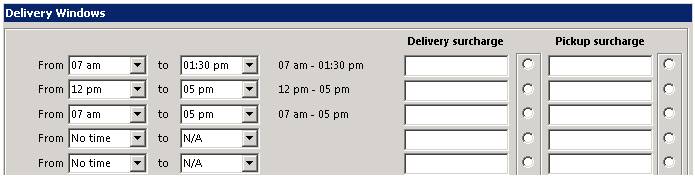
When marking a contract as either a delivery or pickup, the counter person needs to select the delivery/pickup date and time. The time can be selected from a drop down box that has multiple time windows defined. Those delivery times are defined in this section. The setup screen looks similar to the following:
Simply select the starting time and the ending time for each line. You can also add a delivery or pickup surcharge for each time frame or set a default surcharge.
Default Delivery and Pickup Window
You can set a default delivery and pick up time, that will automatically be selected when creating a deliver or pickup.

In you delivery windows, you will have a list of different delivery and pickup times set. To mark these as default times on a contract, click on the radio button across from either the delivery or pickup line you would like to set the default time. You can set a default delivery time from one line and a separate default pick up time from another line.
Ex. If you would like to set the default delivery time to 7am to 1:30pm. You would select the first line and click the radio button under Delivery Surcharge. If you would like to set the default pickup time, then you can select any of the lines with a pick up time and click the radio button under Pick Up surcharge.
No Time - If you select No Time as your default Delivery and Pick Up, then no time will be entered, the driver will not have a window on when he will be making the delivery or pickup.
Contract:

When checking the delivery box from within the contract, the Delivery Date and Time window will appear and show you the default time range you selected.

When checking on the pickup box from within the contract, the PickUp Date and Time will appear and show you the default time range you selected.
