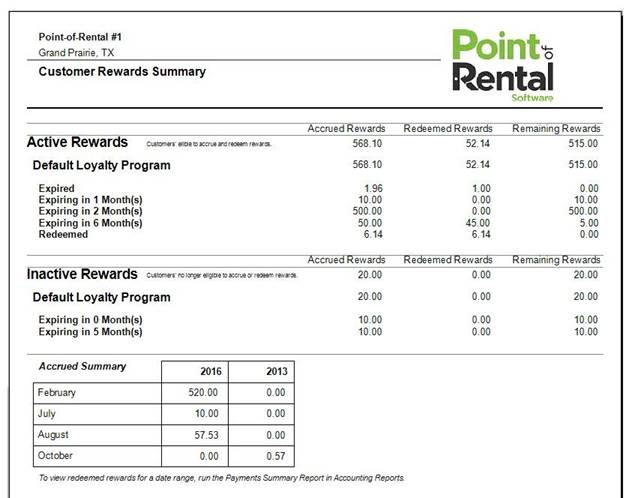
The Customer Rewards Report will show you accrued rewards given to customers who are enrolled in the Rewards Program.
Program Menu>Accounting Reports>Customer Rewards Report
The report will break down the rewards by Accrued, Redeemed and Remaining, showing you the total amount of rewards set in an Active or Inactive status. You can see which customer accounts are eligible for the rewards program by going to Customer Report > Income Menu > Income by Grouping > Group 1 - select Customer Rewards.
Active Rewards
This section will break down the total amount of rewards accrued, redeemed and remaining. The total amounts will be broken down when the rewards are set to expire by months. Expiration dates are constantly rolling; the rewards will expire from the time customer was entered into the Rewards Program to the expiration time period set in configurations
*Note: You can set the expiration date under System Configurations>Customer Configurations>Customer Rewards.
Inactive Rewards
This section will display the inactive rewards that have been deemed inactive. These rewards have either expired or the customer has been deemed not to receive the rewards, by un-checking the box the Customer Rewards box in the Customer Record. You will still see the rewards accrued, but the customer will not be able to use.
*Note: You can opt a customer out of the Customer Rewards Program by going to File Maintenance > Customer Record > Pricing Tab > uncheck the box for Rewards program.
Accrued Summary
The active rewards are accumulated and posted to the report at the close of each day. The summary will show the total amount of rewards accumulated in the current and previous year. To view redeemed rewards for a date range, run the Payments Summary Report in Accounting Reports