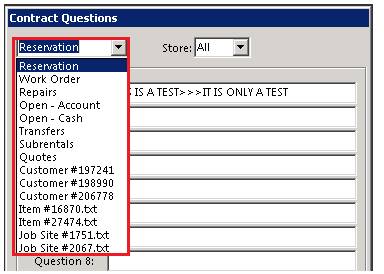
ContractQuestions allows you to setup templates of questions that will be asked each time a contract of a certain type is opened. The available types are Reservation, Customer Work Order, Internal Repair Order,Open – Account, Open – Cash, and Transfers. In addition you can define Contract Questions for a specific customer by typing the customer number in the first drop down box. Regardless of contract type, enter the questions in the question boxes (up to 19 questions). If you desire any of the questions to be required,then start the question with an asterisk “*”. Each time a contract of that type or for that customer is opened, the counter person will be prompted to answer those questions. The questions and the answers typed in will be automatically entered into the contract comment section.
* Note: When setting up contract questions, under contract type (Reservation, Quote, etc), the questions will appear of ALL contract types (Reservations, Quotes, etc). Not on individual contracts.
Set Up:
From Program Menu>Configurations>Transaction Configurations>Contract Questions.
Here you can select where to set the questions. From the drop down menu, you can select (Reservation, Work Order, Repairs, Transfers, Sub-rentals, etc). Select were you want to the question to appear.
* Note - The length of the questions have been extended to 40 characters long.
Once you select the contract type, you can enter your questions. You can enter up to nineteen questions per contract type. You will also be able to select your store or all stores to have the questions appear.

When you go to open a contract that you have assigned questions to, you will see the contract question screen for your employees to enter in the answers to the questions.

Once the questions have been answered, you will be able to proceed to the contract. When either printing, faxing or emailing the contract, You will see the questions in the comments section on the contract.
