
Overview: Allows you to do a continuation billing for a cash customer and carry over any customers deposits.
1. The original contract will show as open with a dollar amount in the deposit field.
2. Select close contract, from Counter System>Close Contract. Once inside the contract select Continuation Billing from the Close contract option box.
3. A calendar will appear highlighting the next 28 days. Select the highlighted date.
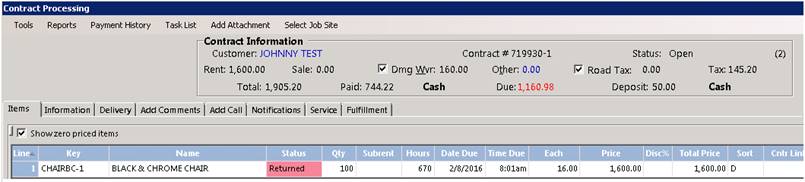
4. Once the date is selected, the status of the contract will go from out (green) to returned (red). The hours will also reflect the 28 days.
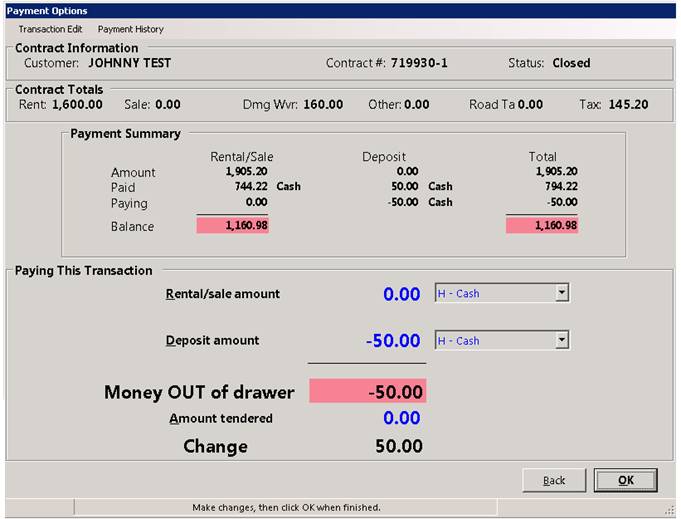
5. At the payment screen you will see the status of the original contract is now closed and a negative deposit amount in the deposit field. When there is a deposit made by cash or check, it will be carried over to the continued contract. "Credit Card Deposits" will either be moved to the balance due on Rental/Sale (to zero out the deposit) of if the contract is paid, the Credit card Deposit will remain on the original contract and will have to be manually moved to the continued contract.
The most efficient way to handle this process is to go to your Active Deposits Report. From the Program Menu>Accounting Reports>Accounting Reports Menu> Active deposit Details. From there you can click on the customer in the report and see their contracts. Right click on the original contract and go to modify, go to the payment screen and make a negative payment in the deposit field for the deposit amount being held, use the payment type of cash. Then go to the continued contract, right click on it to modify. Go to the payment screen, make a deposit payment for the same value by cash to the continued contract.

6. The original contract is now closed and a new contract is opened with a letter at the end of the contract number. At the payment screen, you will see the deposit is a positive number and has been added back on to the new contract.
* Note – If you are continuing the same contract multiple times, you will see the next letter in sequence follow after the contract number. (Ex) 719930, 719930A, 719930B, etc
7. The cash or check deposit will continue to move to continued contracts, until the contract will no longer be continued. On the final contract you can either apply the deposit to the rental/sale or refund the deposit back to the customer.
* Credit Card Deposits will either be moved to the balance due on Rental/Sale (to zero out the deposit) of if the contract is paid, the Credit card Deposit will remain on the original contract and will have to be manually moved to the continued contract.
The most efficient way to handle this process is to go to your Active Deposits Report. From the Program Menu>Accounting Reports>Accounting Reports Menu> Active deposit Details. From there you can click on the customer in the report and see their contracts. Right click on the original contract and go to modify, go to the payment screen and make a negative payment in the deposit field for the deposit amount being held, use the payment type of cash. Then go to the continued contract, right click on it to modify. Go to the payment screen, make a deposit payment for the same value by cash to the continued contract.