Overview: Capping or manufacturing rental and resale items has become a necessary function in the rental industry. From equipment dealers customizing units to event companies manufacturing linens, having a process in place to track the work that needs to be done and maintaining an accurate inventory of parts and raw materials is important and can be accomplished with your Point-of-Rental System.
Capping – Example
New equipment where you offer add-ons to resell or add to your rental fleet.
Tractor (base model)
Cab Enclosure
Air Conditioning
Labor (assembly)
Manufacturing – Example
Buy used equipment from auction for refurbishment and add-ons to resell or add to your rental fleet.
Scissor Lift (used)
New Control Box
Paint
Labor (refurbish)
Build new items from parts or raw goods to resell or add to your rental fleet.
Finished Table Linen
Raw Fabric
Labor (fabrication)
Steps Required:
1. Accurately maintain part inventories or raw material inventories. These are the items that will be used to build a final product.
2. Create new item records (either serialized or bulk) as needed.
3. Write resale or rental transactions and needed.
4. Write a Purchase Order to increase and decrease inventory levels and track open orders.
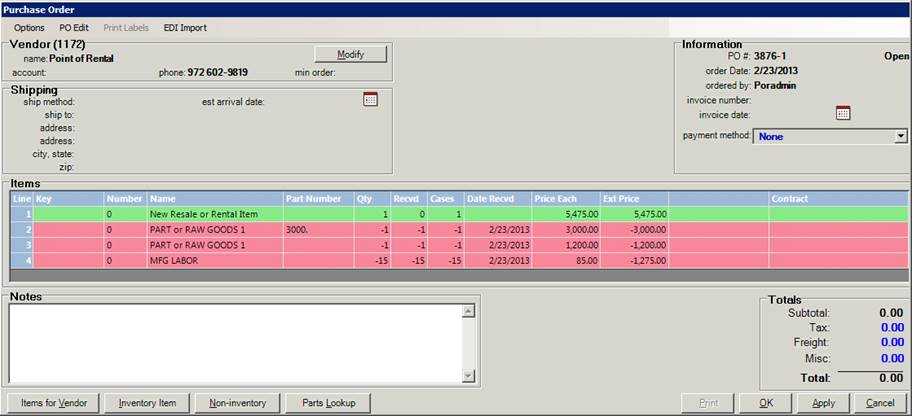
Writing the Purchase Order – (refer to image on page 2)
1. First add the item that you will be manufacturing to the PO.
a. This can be a rental or resale item. If you are not sure create it as a resale item.
b. If this is a brand new item you will need to add it to your system.
c. Serialized items would always be considered new items. If you use Headers then you should create the serialized record from the Header.
d. Bulk items can be selected from your existing inventory.
2. Add the inventory records required to build your finished product.
a. At the quantity field press the letter ‘N’ and press enter. This will allow you to enter a negative value so the system will reduce your inventory rather than add to it.
b. Inventory is adjusted when the part or raw material is received.
3. Add the labor record required to build your finished product.
a. At the quantity field press the letter ‘N’ and press enter. This will allow you to enter a negative value so the system will reduce your inventory rather than add to it. This labor can post to the GL account of your choosing so manufacturing labor can be tracked.
Purchase Order Example:
Part or Raw Material Item Record Example:

Finished Product Item Record Example:
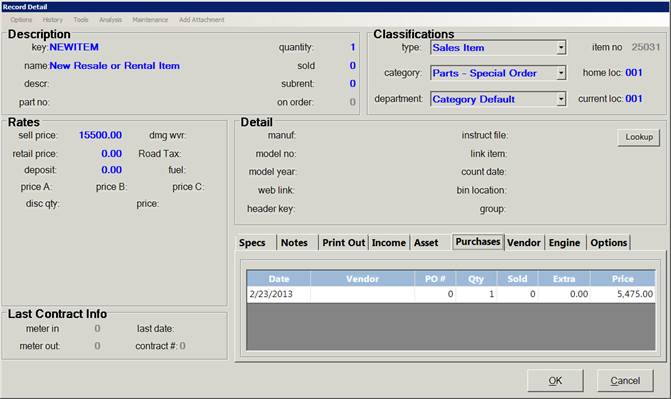
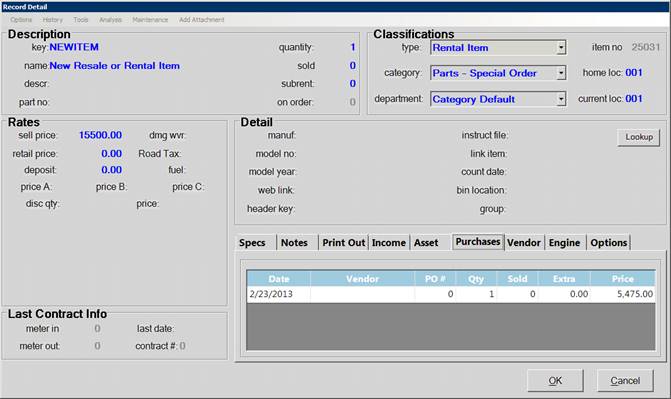
Transfer a Resale Item to Rental:

Finished Product Item Record Example after Transfering to Rental:
Cost of Goods Detail Example after Selling a Resale Item.

Sold Asset Example after Selling a Rental
Item.

Cap, Capping, Capp, Manufacture, Manufactured, Purchase Order, Manufacture resale items, Manufacture rental items