Calendar maintenance defines opening and closing times, days you will be closed, accounting periods and items called ROLL TIME and ROLL DUE. The “ROLL” information is used to define over-night and over-holiday policies.
The Calendar Maintenance program must be run periodically to define your holiday dates and the hours you are open for any partial days you’ll be open such as shutting down early for Christmas Eve. Your first indication that the Calendar is about to expire will be when you see the message “—WARNING—Calendar range exceeded!” displayed when writing a reservation. This message is displayed because the date of the reservation exceeds that presently defined dates in Calendar Maintenance. The program will presume that your store will be open as defined in your “normal workweek.” It is important to run Calendar Maintenance at least yearly to redefine your holidays! If you have the multi-store version, you should be aware that each store has its own Calendar Maintenance program.
Anytime an item is rented for a specific time period the program projects ahead to determine if the store will be open. If not open, the program has to decide a date and time that the item will be “due in” when you are open. This decision will be made using the ROLL TIME and ROLL DUE information stored in Calendar Maintenance.
Suppose you are open Saturday from 7:00am to 6:00pm and closed Sunday. If the roll time for Sunday in your calendar is 4:00pm and the roll due time for Monday is 8:00am what happens if someone rents a trencher for one day (24 hours)at 4:15pm on Saturday. Given this information, the trencher would be “due in” at 8:00am on Monday for your 24-hour rate. The logic is that the trencher is really due in at 4:15pm on Sunday but you’re closed then. Based on this situation the program has to determine if the trencher is due in at closing on Saturday or at the roll due time on Monday. In this example it is due in at the roll due time (8:00am) on Monday because 4:15pm on Sunday is after the Sunday roll time of 4:00pm. Using these same calendar parameters if the trencher was rented at 11:00am on Saturday for the one day (24 hour) rate it would be due back at 6:00pm (closing time) because the trencher is due back at 11:00am on Sunday which is before Sunday’s roll time of 4:00pm; therefore the due in would roll back to closing on Saturday.
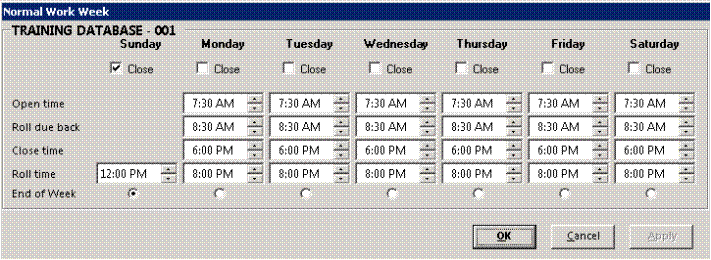
After you enter the owner or manager’s level password, the Normal Work Week for your store will be displayed. The open, close, roll, and roll due back times for a “normal” workweek is displayed. This “normal” week is used for two purposes:
a. If a projected date/time should fall outside the calendar range defined, the counter system will issue a warning message to the operator and then it will assume that the projected date/time is within a “normal” workweek. The CALENDAR MAINTENANCE program must be updated to prevent this from happening.
b. If a projected date is not defined as a “special” day in the calendar, then the counter system will assume that the projected date is within the “normal” work week.
From this screen you can set the normal open, close, roll due back, and roll times as well as the end of week. If you are closed on any day, check the “Closed” box under that day. You will still need to define the Roll Time for days you are closed.
The OK button will save your changes and exit the normal workweek. The CANCEL button cancels the changes and exits the normal workweek. The APPLY button saves your changes but does not exit the normal workweek.
Calendar terms are defined as:
Open time – the time that the store opens for the day.
Roll due back – this is the time that an item will be due back if it was “Rolled” forward from a previous day.
Close time – the time that the store closes for the day.
Roll Time – the cut off time to determine when items are due back. An item projected to be due back at or after this time will “Roll” to the next open day. An item due back before this time will “Roll” back to today’s Close Time. If you don’t want to “Roll” forward on a certain day, set the Roll Time to 11:59PM.
End of Week – the day of the week defined as the ending of the week. This is used by the system to clear the weekly totals during the End of Day Totals. It is also used by Time Clock report to define the default start and ending day of the pay period.