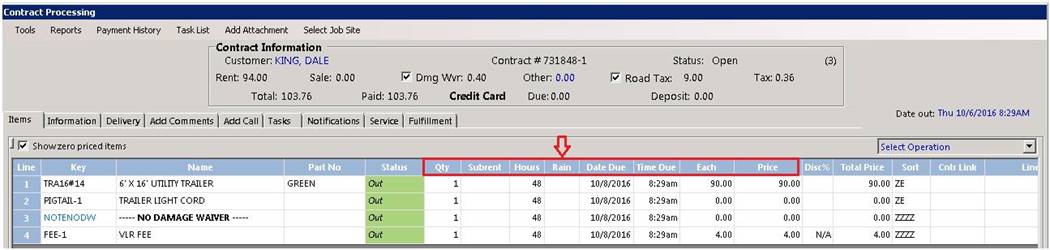
Overview: There are times when a rented piece of equipment can not be used do to the rain. You have the ability to reduce the amount of hours the item has been out on rent. Only charging the customer for the hours used.
1. On the contract you can add a rain column to the contract.
2. Right click on the blue header bar and check rain. You can use the Move Up or Move Down button to position the column on the contract.

3. Enter the number of hours you are going to credit for the rain day. In the example below the number of original hours on the contract is 48 hours. . The number of rain hours you are given is 24 hours, this will reduce the total number of hours the customer is going to be billed by 24 hours. You will also see that the hours and the dollars have changed.
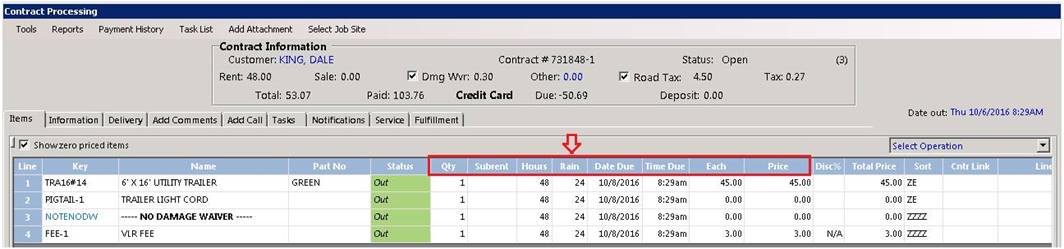
* Note: The hours are base on the rate structure you have set in the file record for that item.
Ex 1. If you have a 24 hour rate and you only given a 4 hour rain day. This would leave 20 hours which would change nothing on the contract. It would still pull off the daily rate set in the item record.
Ex.2 If you have a 4 hour rate and a 24 hour rate and you are only given a 4 hour rain day. This would still leave 20 hour which now calculate 5 times the daily rate.