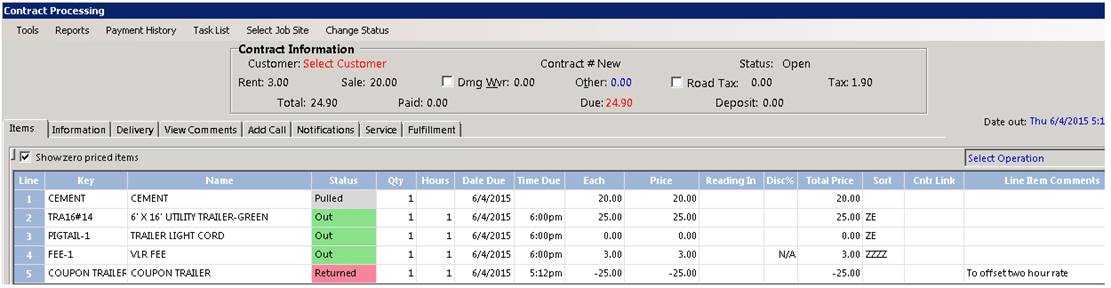
There are times when you might want to give someone free rental for a blocked period of time that is in conjunction with another rental item. (Ex). Some purchasing cement and you give them the trailer free for the first two hours.
1. Main file record. This would be the actual rental or sale item on the contract.
2. Secondary file record. The free rental item they are receiving for a period of time.
3. Discounted coupon – This will discount the rental rate that is on the secondary file.
Setting up file records.
1. Go to the main file record (Cement)
2. Create the secondary file record. (Trailer)
3. Create a new file record, call it Discount Coupon
4. Go to the main file record and enter the trailer as the suggested item
5. Go to the secondary file record – Create a package item adding the discount coupon as part of the package
Note: The coupon will be created as rental item, qty 99999 and sell price of negative $$ (make amount a large number you would not ever exceed)
Creating the Contract
1. Enter main item on the contract
2. Suggested Item box will appear, Enter the quantity to add.
3. Select serialized item
4. When entering the quantity, you will enter a negative amount.
Note: This will be the same amount as the hour rate you want to give for free.
Ex. If you are giving a trailer free for two hours and the normal two hour rate is $25.00. Then you would enter a negative $25.00 in for the coupon to offset the rate.
The coupon will be added to the contract offsetting the trailer rental.