Overview: The barter system is a way to record trade services through a barter marketing system (checking with an accountant for legal ramifications is recommended). A company receives and performs services through bartering/trading with another company. It is accounted for in Point-of-Rental by creating credits and debits without actually giving or receiving money. We will cover two typical methods, keep in mind you would select one or the other, never both.
*Note – This gives a general outline of how to track a typical barter system. However, each barter system can be unique and you may need to adapt these methods to your particular situation,
In this method, everything is contained to the contract. You would take payment for any applicable sales tax or damage waiver (if required) and lower the value of the contract using a coupon item.
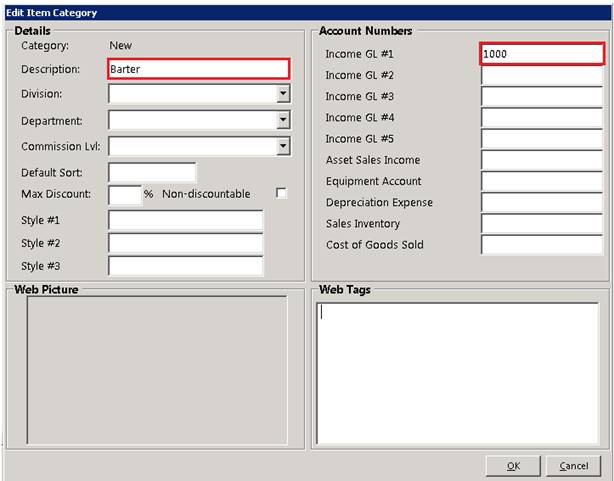
1. Under #9 Configuration>Item Configurations>Item Categories, create a new category and name it Barter (or something to that effect). At the top right, you may assign an income G/L if you want to track the income separately.
2. In File Maintenance, create an item with an Item Type of Rental-Coupon.
a. If sales tax and/or damage waiver is not part of the barter agreement, set the rental coupon to non-taxable and set damage waiver to zero
b. In the sale price enter a neg dollar amount (Make this a large amount)
3. In a contract that has a barter agreement, add it as a line item and it will reduce the value of the contract without reducing tax or damage waiver that still needs to be paid.
a. Enter the dollar amount as a negative number. This will reduce the value of the contract.
4. In your accounting software(not Point-of-Rental) the barter amount can be tracked as barter credits. Any credits spent can be manually adjusted as a journal entry. This is not part of your Point-of-Rental software, if you have questions about this process, you should contact your accounting software representative.
*Note: See Coupons in Net help for instructions on creating a coupon.
In this method, the contract is written as normal, but paid through the accounts receivable process using a unique payment method.
1. Under #9 Configuration>Accounting Configurations>Disbursement Items, create a disbursement item called Barter (or something to that effect). Be sure to check the box for it to be used as an account payment item. Assig a G/L Account if you import G/L entries into your accounting software.

2. In account payments, you now have the ability to give a credit or pay an unpaid transaction using your barter payment type.