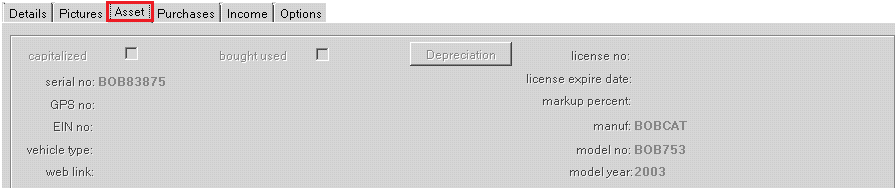
The Asset Tab lists information about the item such as purchase date, serial number, and depreciation information.
Capitalized – this checkbox denotes whether to depreciate the item. Unchecked means that no depreciation is computed. Checked means that depreciation will be computed each month.
Bought Used – this checkbox indicates whether the item was bought either new or used.
Depreciation – clicking on this box will open the Depreciation Schedule window
License No – this is the GPS provider assigned to the GPS unit on this unit.
License Expire Date Allows you to enter the license expire date of the item. You will be able to generate a report to show all items with expired licenses.
Markup Percent – this is the amount of markup for sales items. If you want to charge 50% over the cost, then enter 50 in this field. Whenever the purchase price changes, the sell price will be updated to 50% over the purchase price. This is an optional field. If you want to manually set the sell price, then leave this field blank
Manufacture: Allows you to enter the manufacture for the piece of equipment.
Model No: Allows you to enter the Model No of the equipment
Model Year: Allows you to enter the model year of the equipment
Serial No -- Allows you to enter the serialized number for the inventory item being entered.
GPS no – this is the GPS provider assigned to the GPS unit on this unit.
EIN no – this field holds the equipment identification number assigned to this item.
Vehicle Type: This will allow you to enter the type of vehicle you are entering into the inventory
Web Link: This will allow you to enter a web link