
Overview: How to sell a rental asset and bill your customer in installments. In the example below you will have five contracts for installments and a sixth to make the final adjustments to rental income and asset sale income. Regardless of the number of installments there will always be one additional contract to show the final sale.
1. Write a rental contract or reservation for the length of the rental. In this example five months.
2. Select the rental item and set the special rate for what you will collect monthly ($1000).
3. Be sure to clearly state your terms on the comment tab of the contract.
a. All rental fees will be applied to the sale of unit. Payments will be made over 5 of months. The final sale price will be $5000
b. 80% of rental fees will be applied to the sale of unit. Payments will be made over 5 months. The final sale price will be $5000 with a $1000 buy out
4. Go to task list and set a reminder to yourself or someone else that the 5th month is the last month of billing.
5. Use continuation billing for the following 5 months as you normally would. This will generate a monthly billing of $1000.
6. After the 5th month billing cycle, bill it 1 more time (In this case, the 6th month). The customer may not see this contract (unless there is a balance due). This is an adjusting contract to lower rental income by way of a credit for the previously paid rental amounts and selling the asset.
If you prefer to discount the Asset Sale Value
a. Modify Contract
b. Close the rental item to be sold and zero out the rental vaule for this contract.
c. Right click o the rental item and Asset Sale
d. Enter the sale price, then the serial number.
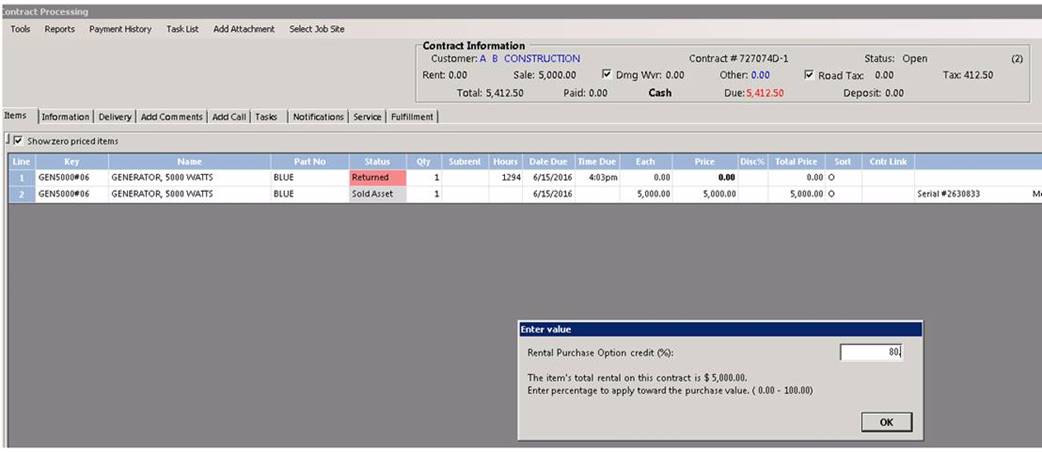
e. Enter the percentage of the retnal builled to be applied to the sales of the item. This will discount the Asset Sale value.

If you prefer to discount the Rental Revenu instead of the Asset Sale Value
1. Add the item back on the contract
2. When it prompts for a quantity type Shift “N” for negative and rpess enter. Enter a quantitiy of -1 (negative -1).
3. Double click the status field, ener C for close.
4. Change the each price to the total amount to be credited from the previously pais rent ($5000). This will reduce the rent value.
5. This contract will lower the rental income by the amount your are applying to the sale of the unit. It will also remove the item from your inventory by way of the asset sale. Below is a snapshot of the final contract.

*Note: If you have a percentage item linked to the rental item. You will need to remove the percentage item before selling the asset.
Go to File Maintenance, bring up rental item, option tab, linked item, remove. Follow steps 6 through 8.