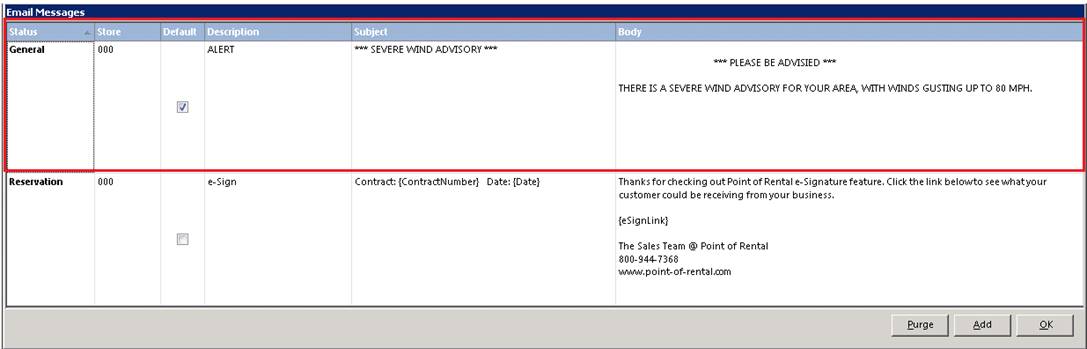
You can send out Alert notifications to customer, such as Weather Advisories, Traffice Delays, Major Accidents. Nofications is a good way to communicate with your customers of any potential delays or warning in relation to customer install.
•Note: Must have purchased the MASS/FAX/EMAIL module.
From System Configurations go to Email Letters, create a defualt *** Alert *** email with the type of advisory you would like to send to your customers. You can set up multiple email letters for different types of advisories.
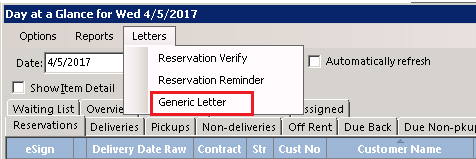
From Day at a Glance, you can select letters, located at the top of the page. From the drop down, select the type of advisory to be sent out. This will automatically send out an alert to all customer located under the current tab.
Ex. If you have the reservation tab opened, an alert will go to all customers under reservations. If you have the went out tab opened, then an alert will be sent out to all customer located under the went out tab.
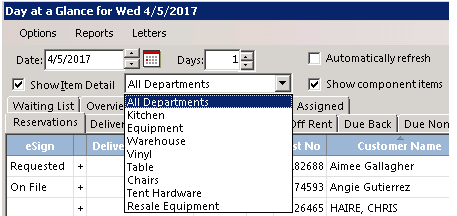
You can refine you selection when sending out alerts by (departments, zip codes, customers, etc).
For departments check the Show Item Detail box and select the department you would like to send the alert to.
You can also hover your mouse over any of the select blue columns and click on the black triangle arrow. This will displays only items in the column. You can check only the boxes you would like to send and alert to.
You can right click on the blue header bar and check the box for zip codes. From there hover your mouse over the word zip code. A small black triangle will appear. Click on the triangle and a box will open to only show all zip codes for those contracts. You can check only the boxes for the zip codes you would want to send an alert to.
Ex. If there is a wind advisory for a certain area, you can select only the zip codes that are effected in that area.
