How to get there: Program Menu > Configurations > System Configurations > AEMP Setup
This allows you to set up a scheduled tasked to updated the AEMP files from the provider to your Point of Rental System. Tasked can be set up to run after business hours.
From Program Menu>System Configuration>Configure Task Runner
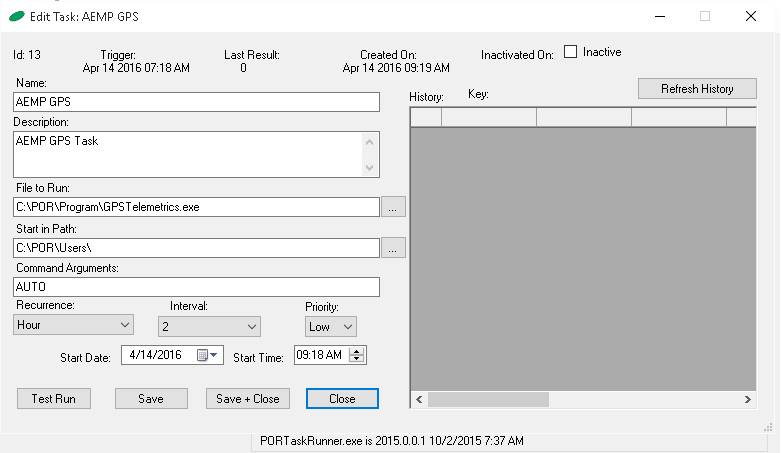
Enter the following information into the respective text boxes. The Start Time can be different depending on when you want the AEMP to happen. The drive letter for the File to Run and Start in Path text boxes can be different, too, depending on the drive letter the Point-of-Rental program is installed on.
Click the Save button when done.
Enter the following information in the appropriate fields.
NAME: AEMP GPS
DESCRIPTION: AEMP GPS TASK
FILE TO RUN: (PORDRIVE):\POR\PROGRAM\GPSTELEMETRICS.EXE
START IN PATH: PORDRIVE:\POR\USERS\
COMMAND ARGUMENTS: AUTO
RECURRENCE: RECOMMENDED MINUMUM 2 HOURS, CAN SET TO 1 HOUR BUT IF THIS UESER HAS LOTS OF ITEMS AND TAKES MORE THAN AN HOUR TO DOWLOAD IT WILL NOT UPDATE THAT NEXT HOUR, WHICH WILL THEN BE 2 HOURS
INTERVAL: RECOMMENDED MINUMUM 2
PRIORITY: LOW