The Association of Equipment Management Professionals (AEMP) allows you to get the hour meter reading as well as the location of items in your fleet. To enhance this, your items will be polled at least once a day and the current meter will be automatically updated in the inventory record. This allows your maintenance due and service due to be up to the minute all the time. So if your customer is running your equipment 24/7, you will know right away that you need to go out and service the equipment.
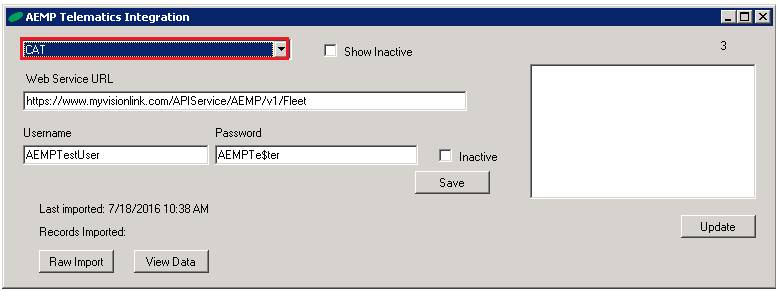
From Program Menu>Configurations>Store Configurations>AEMP GPS SETUP
You can interface with any manufacturer or GPS provider that is compatible with the AEMP standard.
Web Service URL – Enter the URL for the manufacture website
Username– Enter Username
Password– Enter Password
Last Imported– Shows date items were last imported
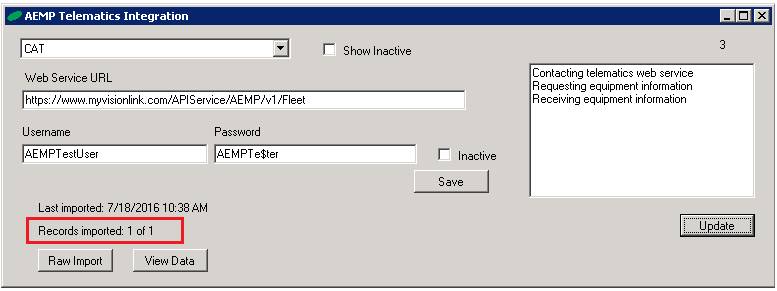
Records Imported– Number of records imported
Raw Import - This will show items that have not linked to a GPS unit
View Data - Allows you to view the raw import from each vendor's downloaded.
Once the fields are populated, select update, files will be imported from the manufacture. You will see in bottom left corner the number of files will be imported.
* Note: You need to set the GPS # in each of your serialized item Records. Go to Program Menu>File Maintenance>Asset Tab.
1. Go to Program Menu>File Maintenance>Asset Tab.
2. Enter GPS Equipment ID Number. Once entered, you will see the GPS Link appear at the top of the Item Record.
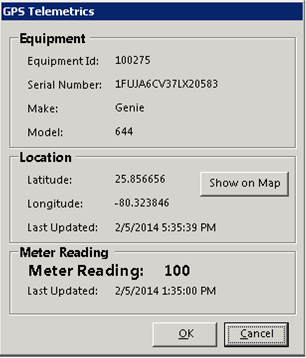
3. A GPS Telemetic box will appear. Once linked, the GPS Telemetric box will populate the latitude and longitude along with the last time unit was updated.
* Note - This option will only show up on serialized assets. Set up with a GPS and linked to and AEMP account. When selected you will see the Equipment information, location, and last updated meter reading.
AEMP Set to TaskRunner

AEMP GPS SETUP
NAME: AEMP GPS
DESCRIPTION: AEMP GPS
TASK
FILE TO RUN:
PORDRIVE:\PROGRAM\GPSTELEMETRICS.EXE
START IN PATH:
PORDRIVE:\POR\USERS\
COMMAND ARGUMENTS: AUTO
RECURRENCE: RECOMMENDED MINUMUM
2 HOURS, CAN SET TO 1 HOUR BUT IF THIS UESER HAS LOTS OF ITEMS AND TAKES MORE
THAN AN HOUR TO DOWLOAD IT WILL NOT UPDATE THAT NEXT HOUR, WHICH WILL THEN BE 2
HOURS
INTERVAL: RECOMMENDED MINUMUM
2
PRIORITY: LOW