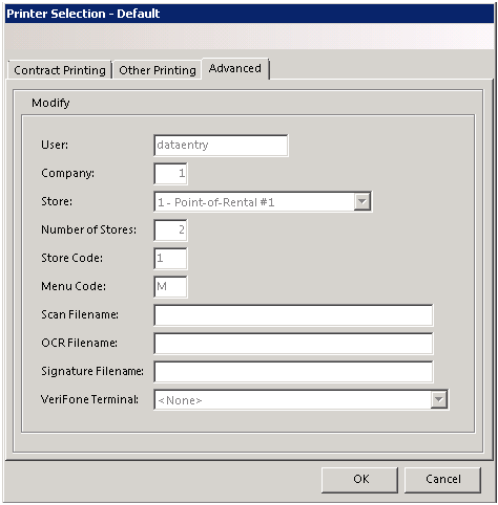
User - This is the user name of the current terminal
Company – This is the company number in use
Store – This is the store number that you are logged into
Number of Stores – This is the number of stores that you are licensed for.
Store Code – This is the code used to signify this store.
Menu Code – This is the menu code used for this terminal.
Scan Filename – This is the path and filemane of the customer’s picture for the scanner.
OCR Filename – This is the path and filename of the cusomer’s license information.
Signature Filename – This is the path and filemane of the customer’s signature capture file.
Once you select all of your printer names, click the OK button. You might be asked whether to update the default printers. If you answer Yes, then your current printer selections will be the printer selections for ALL terminals. If you answer No, the only the printer selections for the terminal will be updated.